Vellum and Calamus both get your book to the same ending place, a professional print interior and an EPUB, but each covers very different amounts of ground getting there.
The comparison is lopsided from the start, because the two are not trying to do the same amount of work. Vellum takes a finished manuscript and turns it into a book. Calamus takes an idea you had from scratch, and carries it through drafting, world-building and formatting to the same finished book, all the way to sharing it on social media through an internal scheduler along with the companion iPhone app, Calamus Ideas. Both produce a professional print interior and an EPUB. Only one of them is somewhere you'll want to write.
That difference decides most of it, so here is the short version. If you draft happily in Word or Pages, you own a Mac, and all you want is a beautiful interior with almost no decisions to make, Vellum is a very good answer and has been for years. If you want the drafting tools and the formatting in the same place, or you write on an iPad or a phone, or you are not on a Mac, Vellum cannot serve you and Calamus can. Especially if you find yourself making corrections last minute and suddenly your draft doesn't match your formatting file (we've been there, sadly.)
What Vellum is Genuinely Good at
We loved and used Vellum for years. It's just... it became a hassle to have to keep two separate sets of files synced with last-minute changes.
Vellum's central design decision is largely based on restriction. There are 26 typefaces and a small set of book styles. You pick a style, the app applies it consistently to every chapter opener, scene break, drop cap, running head and page number, and the result looks like a book from a publisher. There is no kerning panel to get lost in and no baseline grid to misconfigure. Because the range of choices is small and every choice in it was made by someone who knows typesetting, it is genuinely difficult to produce an ugly book in Vellum.
For a self-publishing author that is worth a great deal. Typesetting is a craft, and most novelists have no reason to have learned it. Vellum has been the shortest route from a finished manuscript to a professional print interior for years, and the reason people recommend it so consistently is that it delivers exactly what it promises with almost no learning curve. Import a DOCX, pick a style, export EPUB, MOBI, PDF or DOCX. That is the whole workflow, and it works.
The trial model is also unusually generous. You can use Vellum indefinitely and see your book laid out; payment is what unlocks export and a finished file you can generate an income off of.
Where Vellum Starts & Stops
It is Mac only. No Windows, no iPad, no phone, no browser. If your writing machine is a PC, Vellum is not available to you at any price, and the usual workaround, renting a Mac in the cloud to run it, tells you something about how firm that constraint is.
It is $249. That is the highest one-time price in this category, and it only buys you formatting. Which means you still have a file floating around with all of your changes somewhere else.
It has no drafting tools. No Binder, no Corkboard, no Outliner, no notes, no snapshots, no world-building. You write the manuscript elsewhere and send the finished file to Vellum. That is a legitimate design choice, but it means Vellum is always the second app in a two-app workflow, and you are paying for the first one separately.
There is no sync. Files are stored solely on the machine in front of you.
Export is the paywall. You can lay the whole book out and see it, and the purchase is what releases the file. That is a defensible way to price a tool that produces something you are going to sell, and Calamus draws the same line in a different place: Compile is locked during the 14-day trial while your manuscript downloads throughout, so the writing is never held back even though the finished book is.
What Calamus Does Differently
Calamus is $189 one time, with free updates, and it runs natively on Mac, iPad and through Calamus Ideas, the iPhone app, as well as in a browser. Sync is built into the app rather than routed through Dropbox or iCloud, so the same project is on the desktop where you do long sessions and on the phone where you catch a note.
On the formatting side it does the same job as Vellum. Compile produces EPUB, print PDF at real trim sizes, DOCX and Markdown, and there are 1,900+ typefaces available, licensed for embedding in books you sell. That last detail matters more than it sounds: embedding rights are the difference between a font you can look at and a font you can ship inside a book you are selling.
On the drafting side it does a job Vellum does not attempt at all:
- Binder. The nested structure of parts, chapters and scenes, which is also the manuscript. Rearranging the book is rearranging the Binder.
- Corkboard. Scenes as cards you can move around when the order is not settled yet.
- Outliner. The same material as rows with the fields you care about, for when you want to see shape rather than prose.
- Codex. Structured world-building with 14 typed categories: Characters, Locations, Factions, Magic Systems, Lore, Cultures, Languages, Timeline, Glossary, Lineages, Regions, Maps, Storylines and Items. Each has its own fields rather than being a free-text page you have to keep tidy yourself.
- Snapshots. Earlier drafts kept and restorable, so a heavy revision pass is reversible.
- Ideas. Notes captured on a phone that arrive in the book.
- Moodboard and Research. The visual and reference material that usually ends up scattered across a desktop folder.
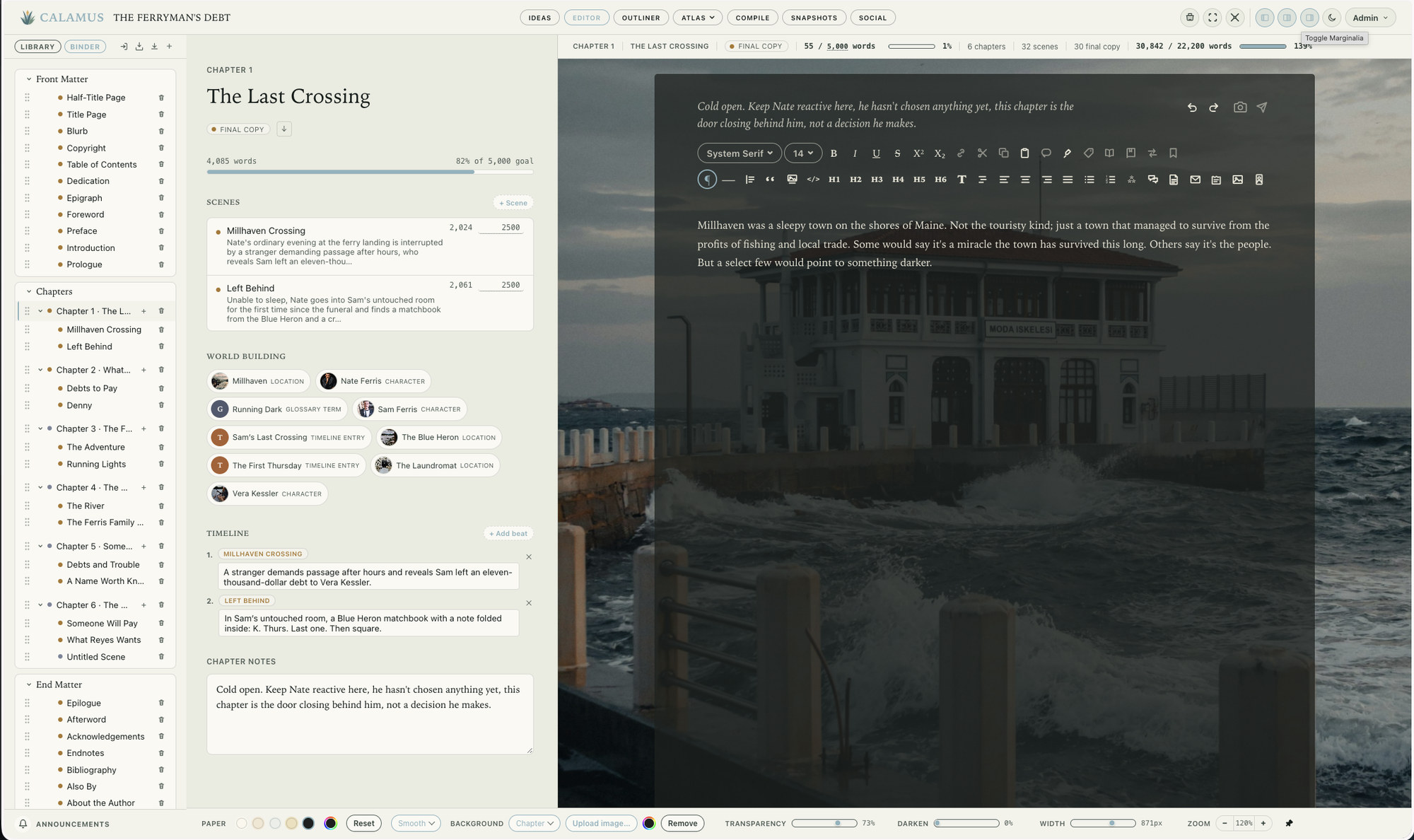
The practical result is that the manuscript never leaves the app to become a book. There is no export-to-DOCX, import-into-formatter, discover-your-italics-broke round trip, and no second license to buy.
Pricing Over Time & Multiple Books
Vellum is $249 once. Calamus is $189 once. Neither is a subscription, and both include future updates, so on a five-year view the numbers stay where they are: $249 against $189.
But the comparison is not really $249 against $189, because Vellum does not draft. The realistic Vellum setup is Vellum plus a drafting tool, whether that is Word you already own, Scrivener at $59.99 per platform, or a subscription like Dabble at $19 a month. Add the drafting tool you would actually use and the totals separate further. If your drafting tool is Word or Pages you already have, Vellum stays at $249 and that is a fair price for what it does.
So you could argue that Calamus should really be priced much higher, which is a good reason to get on board now rather than later.
Platforms
This is the cleanest dividing line between the two. Vellum is Mac only: one machine, no sync, no tablet, no phone.
Calamus: Mac, iPad, iPhone and browser, with iPad and iPhone included rather than sold as extras, and sync built in. Writing a scene on an iPad in the afternoon and finishing it on the Mac at night is the normal way to work, not a workaround.
If you own only a Mac and write only at a desk, this difference costs you nothing. If you do not, it decides the question by itself.
Typefaces and Trim Sizes
Both apps produce a print PDF at real trim sizes, which is the thing you actually need for KDP or IngramSpark. The difference is in the library. Vellum's 26 typefaces are curated to the point where the wrong choice is hard to make. Calamus offers 1,900+, which is more range and correspondingly more responsibility; you can match a series style, follow a designer's brief, or set a book in something specific to your genre, and you can also pick badly if you are not paying attention.
Neither approach is better in the abstract. If you want typography decided for you, Vellum's smaller set is a feature. If you want to make the decision yourself, or you have a house style across a series, the larger library is the one you want.
Who Should Buy Vellum
An author on a Mac who already drafts comfortably in Word, Pages, Google Docs or Scrivener, who is happy with that arrangement, and who wants a professional print interior without learning typesetting. Vellum will do that job well, quickly, and with almost nothing to configure. Nothing in this post should be read as a reason to avoid it; it earned its reputation.
It is also the right pick if you have already bought it. Vellum plus whatever you draft in is a working system, and there is no prize for changing tools mid-series.
Who Should Buy Calamus
An author who wants the whole arc in one place: capture the idea on a phone, draft it, build the world around it, format the book, and share it. Someone who writes across a Mac and an iPad and wants sync that is part of the app. Someone on a series with a lot of continuity to keep straight, where a typed Codex earns its keep by book three. Someone who would rather make one $189 purchase than assemble a drafting tool and a formatter.
Calamus has a 14-day free trial. Compile is locked during the trial, though your files still download, so you can put a real chapter through the drafting side and see whether the Binder, Codex and Snapshots suit how you work. The full price breakdown is worth reading alongside the comparison table, and if you are weighing this specifically against Vellum, the Vellum alternative page sets the two side by side feature for feature.
How to Decide Quickly
Answer three questions. Do you need a place to write, or only a place to format? Do you write on anything other than a Mac? Do you want your notes, structure and manuscript to live with the finished book, or are you content to keep them apart?
If the answers are format only, Mac only, and content to keep them apart, buy Vellum. If any answer goes the other way, Vellum cannot cover it, and a suite that drafts and formats in one place is the thing you are looking for.
If a suite is what you are after, the guide to book writing software compares the ones worth considering.
Chad & Melody
Co-founders of Calamus
The Calamus Team