Launch pricing
One purchase. No subscription.
Calamus (iPadOS, macOS, browser) is in Beta testing and isn’t open for purchase yet. Leave your email and we’ll let you know the moment it is while we show you everything it can do to change your entire writing and publishing experience for the better.
Calamus is a one-payment, no subscription, no renewal date writing software application for iPadOS, macOS, and browser. Calamus Ideas for iPhone is sold differently: it is free for anyone who owns a fully licensed copy of Calamus, and it is available for download on the App Store. Writers who do not own Calamus (the iPadOS, macOS, and browser app) can subscribe to Calamus Ideas on its own for $4.99/month, available for purchase in that app.
What’s included
- Unlimited books, unlimited words
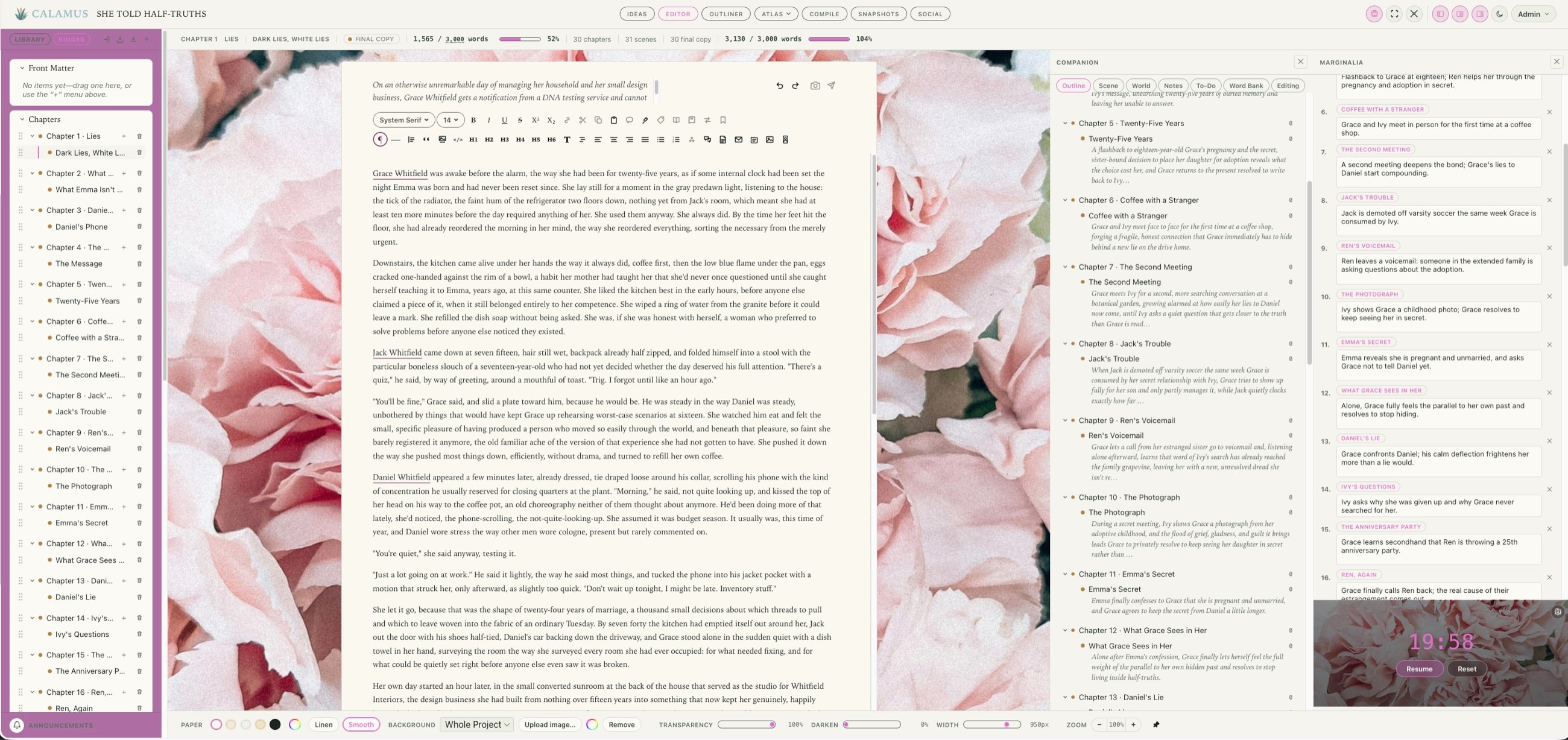
- The full manuscript editor: Typewriter Mode, Focus Mode, Composition Mode
- Compile to EPUB & PDF, every retailer trim size
- Supports 1,900+ Google typefaces
- The full world-building codex: characters, locations, factions, magic systems, lore, cultures, languages, timeline, glossary, lineages, regions, maps, storylines, and items
- Every future update on existing modules
How the trial works
- No card, now or when the 14 days are up
- Everything here except Compile
- Your manuscript downloads any time: DOCX, RTF, Markdown, plain text
- In your browser; the native apps come with the full version
- Seven days of account access when it ends
- One trial per email address
One purchase, or two
What you get, next to what you’d otherwise buy.
Every product here is one an author is choosing between for the whole job: writing the book, and producing the file a store will accept. Tools built for one part of that, like Campfire and World Anvil for world building or Plottr for plotting, are not compared here. Prices are the vendors’ own published figures, checked in September 2026.
One row needs a word of explanation. The phone app is Calamus Ideas, and it is a companion rather than a small copy of the desktop app: it provides Ideas, the Focus Timer, Quotes and social sharing, and what you capture on it syncs into the book. You can write in the ideas and notes it keeps, and some people do, but drafting a novel happens on the Mac, the iPad or in the browser. Scrivener’s iOS app is a full manuscript editor, and on that row it does something Calamus does not.
| Feature | Scrivenerone-time | Vellumone-time | Atticusone-time | EmberWriteone-time | Dabblesubscription | Codex Heimsubscription | Calamusone-time |
|---|---|---|---|---|---|---|---|
| Where you can write | |||||||
| Platforms | Mac, Windows, iOS | Mac | Windows, Mac, Linux, Chromebook | Mac, WindowsApple Silicon only | Browser, mobile | Browser | Mac, iPad, iPhone, browseriPhone runs Calamus Ideas; Windows and Android planned for 2027 |
| How the app is builtA real program on your computer, a website wrapped in one, a website with its own icon, or a browser tab | Nativea real program on your computer | Nativea real program on your computer | Web appa website with its own icon (PWA) | Wrappeda website inside a desktop program (Electron) | Wrappeda desktop program that loads the website (Electron) | Browser onlynothing to download | Native and browsera real program, plus the web |
| Runs in a browserNothing to install | – | – | ✓ | – | ✓ | ✓ | ✓ |
| Write on your iPadNative app, not a browser tab | Yes$23.99 extra | – | Browser only | – | Browser only | – | Yesincluded |
| Write on your phoneNative app, not a browser tab | Yes$23.99 extra | – | Browser only | – | Browser only | – | Ideas and notesCalamus Ideas, not full drafting |
| Sync between your devicesWithout a third-party service | Dropbox or iCloud requireda long-running source of sync trouble | – | ✓ | Nolocal files, one machine | ✓ | ✓ | Yesbuilt in |
| Getting it read | |||||||
| Pull a quote while you draft | – | – | – | – | – | – | ✓ |
| Schedule posts to Bluesky | – | – | – | – | – | – | ✓ |
| Share buy links from your phone | – | – | – | – | – | – | ✓ |
| Your files | |||||||
| Importing options | DOCX, RTF, more | DOCX | DOCX | ? | Nopaste only | DOCX, TXT, RTF | DOCX, RTF, Markdown, TXT |
| Exporting options | EPUB, PDF, DOCX, Markdown | EPUB, MOBI, PDF, DOCX | EPUB, PDF, DOCX | ePub, PDF, DOCX | DOCX, PDF, Markdown | Manuscript only | EPUB, PDF, DOCX, Markdown |
| Typefaces supported | System | 26 | 1,500+ | – | – | – | 1,900+ |
| Print PDF at real trim sizes | Limited | ✓ | ✓ | Manuscript format | – | – | ✓ |
| Download your manuscript before you buy | ✓ | Noexport is the paywall | Nopaid up front | Nopaid up front | ✓ | Limited | ✓ |
| Drafting | |||||||
| Binder | ✓ | – | Chapter list | Spaces | ✓ | Limited | ✓ |
| Corkboard | ✓ | – | – | – | – | – | ✓ |
| Outliner | ✓ | – | – | ✓ | Yesplot grid | ✓ | ✓ |
| MarginaliaLive stats and keywords for the open scene | YesInspector | – | – | – | Notes and comments | Rich comments | ✓ |
| The CompanionOutline, world and notes for the whole book | – | – | – | Quick reference panes | – | – | ✓ |
| Focus Mode | NoComposition only | – | ✓ | – | ✓ | ✓ | ✓ |
| Typewriter Mode | ✓ | – | – | – | ✓ | – | ✓ |
| Composition Mode | ✓ | – | – | – | Yesfull screen | – | ✓ |
| Snapshots | ✓ | – | Coming soon | 5 auto-backups | YesTime Machine | Limited | ✓ |
| Building the world | |||||||
| Structured CodexTyped fields per category | Folders and templates | – | – | Character and location sheets | Story bible | ✓ | ✓ |
| Visual relationship map | – | – | – | ? | – | Yeslineage canvas | ✓ |
| Tag a name in prose, keep it linked | – | – | – | Yessmart links | – | ✓ | ✓ |
| Moodboard | – | – | – | – | – | – | ✓ |
| Terms | |||||||
| Unlimited books and words | ✓ | ✓ | ✓ | ✓ | ✓ | No10 projects | ✓ |
| Every feature available immediatelyOnce you own it | ✓ | ✓ | ✓ | ✓ | ✓ | Nounlocked by tasks | ✓ |
| Locked during the trial | Nothing | Downloadsdownload is the paywall | No trialpaid up front | No trialpaid up front | Nothing | Features, until tasks are done | Compileyour files still download |
| Future updates included | Partlypoint updates free, major versions paid | ✓ | ✓ | ? | Yeswhile subscribed | Yeswhile subscribed | ✓ |
| Free trial | 30 days | Unlimiteduntil export | None30-day money-back guarantee | Yes | 14 days | 7 days | 14 days |
| Price | $59.99per platform | $249.99ebook and print; $199.99 ebook only | $147ebook and print | $65desktop | $19per month, or $699 once | $15per month | $189one-time |
| Cost over five years | ~$122all platforms | $249.99 | $147 | $65 | $699lifetime plan | $900 | $189 |
A dash means the product doesn’t offer it; a dashed circle means we haven’t confirmed it and would rather say so than guess. Five-year figures assume today’s list prices hold.
How these apps are built
Native, Wrapped, Web App, or Browser
The row above says how each app is built. That sounds like a technical detail and it is really a practical one: it decides what happens when your internet drops, which of your fonts you can use, whether dictation and screen readers work properly, and whether a copy of your book exists on your own computer. Here is what each one means in plain terms.
Native
A real Mac or iPad program, built the same way Pages or Scrivener is. You download it, it lives on your computer, and it opens whether or not you are online.
How safe your work is
Apple checks it before it will run, though that is true of most of these and is not the difference. Two things are. There is no second web browser hidden inside it that needs its own security updates. And what Apple checked is exactly what runs when you double-click it.
What writing in it feels like
Typing behaves the way it does everywhere else on your machine. Dictation works. Autocorrect and smart quotes work. Screen readers work. The keyboard shortcuts your fingers already know are the right ones. It opens like a program rather than loading like a page, and being offline is just normal rather than a special mode.
What it means for your bookThis is the version with the fewest ways to lose an entire afternoon of writing. Your book is held by a program on your own machine, not by a page that can log you out or go dark in the middle of a sentence. Every font you own shows up, not just the handful the app decided to include. That does not make this the right way to build all software; it makes it the right fit for a book. You will spend hundreds of hours typing into this. In the other three, every one of those keystrokes passes through a web browser first. In this one it does not.
Wrapped
A website with a program wrapped around it, so one version can run on Mac, Windows and Linux at once. It looks like an app in your dock, and there is a web browser tucked inside it doing the work.
How safe your work is
Fine in principle, and these are checked by Apple like anything else. The catch is how long a security fix takes to arrive. Some of these carry their own private copy of Chrome, so a fix has to be released by Google, picked up by the toolkit, then released again by the app before it reaches you. Others borrow the browser already on your Mac, which is much quicker.
What writing in it feels like
Good, and better than it was a few years ago. The differences are at the edges: dictation can be patchy, screen readers depend on what the web layer bothers to pass along, and your hundred thousand words are being laid out by a browser rather than by your Mac.
What it means for your bookDay to day, most writers will not notice. Two questions are worth asking before you trust a book to one. Which fonts can you actually use, since a web layer usually offers a fixed list rather than everything you own? And what happens with no internet at all, since some of these keep a copy on your machine and some just fetch the website? The answers differ from product to product.
Installed web app
A website you can add to your dock or home screen so it gets its own window and its own icon. It looks like an app, but there is no program on your computer; the browser is still running it.
How safe your work is
The browser keeps it walled off from the rest of your machine, which is genuinely safe, and there is nothing installed for you to keep updated. What it needs is a current browser and a session that has not expired.
What writing in it feels like
Its own window, and it can work offline using a copy the browser saved earlier. Typing still goes through the browser, so dictation, autocorrect and screen readers are whatever the browser passes through.
What it means for your bookWorking offline depends on a copy your browser kept, not on a program holding your book. So clearing your browser data, getting signed out, or a long flight are the things to plan for. Fonts come from the list the app ships, not the ones you own. Export your work regularly.
Browser only
It runs in a browser tab and nowhere else. There is nothing to download and no copy on your computer, so every time you write you are asking a website for permission to open your own book.
How safe your work is
Safe enough in the ordinary sense: the browser walls it off, and there is nothing on your machine to keep patched. The risk here is not really about someone breaking in. It is about you being locked out, because reaching your own manuscript depends on somebody else's website being up and your login still working, and neither of those is yours to control.
What writing in it feels like
Works on any computer with nothing to install, which genuinely helps on a borrowed desk. It also stops the second your connection does, and there is no copy on your machine to fall back on.
What it means for your bookThis is the one worth a plain warning. If the site is down, if the company is bought or closes, or if you are somewhere with no signal, you cannot open your manuscript at all. Not a slower version, not a read-only version. None of it. Writers keep their tools for years, often longer than the companies that sell them, so ask what happens to your book on the day the site will not load, and download your own copies regularly whatever the answer is. Browser-only writing apps should not be trusted implicitly; they should always be accompanied with a Native app that syncs without a third-party storage app so your work is safe.
Conclusion
All four will let you write a book. Not all of them will open it when the internet is down.
None of these is a bad way to build software, and anyone telling you otherwise is selling you something. Wrapping a website lets a small team support Mac, Windows and Linux at once. A web app opens on a borrowed laptop with nothing to install. Both are sensible, and writers finish books in both every day. The useful question is simpler than which one is better: does a copy of your book end up on your own computer, or does it not?
What separates them matters more for writing software than for most other kinds. Writing a book depends on the things a website has to work around: the typing and page layout your Mac already handles well, the fonts you own, dictation, the accessibility tools some writers rely on, and simply working when there is no internet. Those are small things in most programs and large ones here, because they are what you touch every day for a year.
So the thing to decide is what you want holding your book for the several hundred hours it takes to write one. Calamus is a real app for Mac and iPad, with Calamus Ideas for iPhone and the browser available for when you are at someone else’s desk. That is why it was built this way.
- Unlimited books
- Unlimited words
- The full manuscript editor
- Compile to EPUB & PDF
- Supports 1,900+ Google typefaces
- Tagging
- Every future update on existing modules
Common questions
What people ask before joining the waitlist.
Is this a subscription?
No. One payment, and Calamus is yours. There is no renewal date, no plan to keep active, and nothing that stops working if you walk away for a year and come back. The one exception is not Calamus: see Calamus Ideas below.
What about Calamus Ideas?
Calamus Ideas for iPhone captures notes, collects quotes, runs a focus timer and keeps a writing log. If you own Calamus it is free, with nothing further to pay and nothing to subscribe to. It is also sold on its own to writers who do not own Calamus, as a $4.99 monthly subscription bought inside the app through Apple. That does not change anything about Calamus itself: buying Calamus still means one payment and no subscription, and it still includes Ideas.
When does it launch?
Calamus is in beta with a group of writers testing it under NDA, and is not open for purchase yet. Join the waitlist and we will let you know when it opens, along with what we are building in the meantime.
Can I try it before buying?
Yes. 14 days in your browser, no card, with everything except Compile. Your writing stays yours throughout and downloads as DOCX, RTF, Markdown or plain text whenever you want. What you are buying is the whole app: the native Mac and iPad apps, Calamus Ideas on the iPhone, continued use of the browser version, and Compile, which turns the manuscript into the finished, formatted book. When the trial ends you keep account access for seven days, and buying inside that window reopens everything with every word in place.
What does it cost?
$189, once. During the launch window it is $129. That is the whole price; there is no upgrade tier and nothing is held back behind a bigger plan.
Do future updates cost extra?
No. Every update to what you bought is included for as long as Calamus is developed. We will never take away access or move a feature you paid for behind a new price, the way other companies do; what you own today you keep, and we only add to it. If we ever build something genuinely new and large enough to stand on its own, existing owners will have the option to add it, and nothing you already have will stop working or be moved behind it.
Can I use it for more than one book?
Yes. Unlimited books and unlimited words at one price, with a Library holding everything you have written and separate pen names if you publish under more than one.
What does it run on?
You write in the browser on any computer including Windows, and in the native Mac and iPad apps. One account and one manuscript across those, so you can close the Mac mid-sentence and open the iPad where you left off. The iPhone runs Calamus Ideas, for catching notes, running a writing session and sharing quotes rather than drafting a chapter.
Do I need to be online?
Not on the Mac and iPad apps. They keep working with no connection at all and catch up when you are back. The browser needs a connection, which is exactly why the native apps exist.
Can I bring a book I have already started?
Yes. Import from Word, Scrivener, Pages, Google Docs or Markdown. Calamus reads the chapter breaks out of the manuscript itself rather than asking you to mark them by hand.
What can I get back out of it?
DOCX, RTF, Markdown and plain text at any time, and EPUB and PDF from Compile. You can also ask for a complete export of everything you have ever written as a single archive. Nothing is held hostage to keep you here.
Which fonts can I use?
Compile supports over 1,900 Google typefaces, embedded properly in the exported file, with separate faces for headings, body text and running heads.
Is it only for novels?
No. Fiction and nonfiction both, with the structure each one needs rather than one bent to fit the other: scenes and beats for a novel, parts and sections for nonfiction.
Do you train AI on my writing?
No. Your manuscript is not used to train anything, not by us and not by anyone we work with. It is your book.
Is my manuscript protected?
Two-factor authentication is built in, free, and checked on every request to your books rather than only at the login screen. Every scene keeps its own version history that builds itself as you write, so a bad afternoon of edits is recoverable.
Do you offer refunds?
No, and the 14-day trial is why. It runs in your browser with no card, so you can write in Calamus properly and decide before you pay anything. Once you buy, the software is delivered and Compile is switched on straight away, so there is nothing to give back. If the trial has not answered your question, write to us before you buy and we will. Buyers in the European Economic Area and the United Kingdom have a withdrawal right under their own consumer law, and the terms set out how that works and when it applies.
Will Calamus still be here in ten years?
That is the plan, and it is written down rather than hoped for. Calamus LLC has a succession plan that keeps the company in the family and a legal trust behind it to keep things running, so your books have a home here rather than depending on two people staying at their desks. You also keep your own copy regardless: the Mac and iPad apps hold your work on your machine, and exports are unlimited and one click.
Come write with Calamus.
Launch pricing
One purchase. No subscription.
Calamus (iPadOS, macOS, browser) is in Beta testing and isn’t open for purchase yet. Leave your email and we’ll let you know the moment it is while we show you everything it can do to change your entire writing and publishing experience for the better.
Calamus is a one-payment, no subscription, no renewal date writing software application for iPadOS, macOS, and browser. Calamus Ideas for iPhone is sold differently: it is free for anyone who owns a fully licensed copy of Calamus, and it is available for download on the App Store. Writers who do not own Calamus (the iPadOS, macOS, and browser app) can subscribe to Calamus Ideas on its own for $4.99/month, available for purchase in that app.
What’s included
- Unlimited books, unlimited words
- The full manuscript editor: Typewriter Mode, Focus Mode, Composition Mode
- Compile to EPUB & PDF, every retailer trim size
- Supports 1,900+ Google typefaces
- The full world-building codex: characters, locations, factions, magic systems, lore, cultures, languages, timeline, glossary, lineages, regions, maps, storylines, and items
- Every future update on existing modules
How the trial works
- No card, now or when the 14 days are up
- Everything here except Compile
- Your manuscript downloads any time: DOCX, RTF, Markdown, plain text
- In your browser; the native apps come with the full version
- Seven days of account access when it ends
- One trial per email address
Ideas, Writing, Creative Vibing, Compiling, and Marketing: One Tool.
Calamus is in Beta testing; join the waitlist, learn about how Calamus will help you grow as a writer, and be the first to know when you can start writing and publishing with Calamus.