Snapshots
Every version of every scene and chapter, saved as you write.
Calamus takes a snapshot as you work and stores the text with it, not just the word count. You can cut hard, rewrite an opening four ways, and put any of the last twenty versions back. The checkpoints you take yourself are held onto longer than that, and the timeline itself is never trimmed.
Saved without asking
No save-version button to remember before you try something.
Snapshots build themselves while you write, so the safety net is there on the days you forget it exists. That frees you to experiment on the page instead of protecting what is already down.
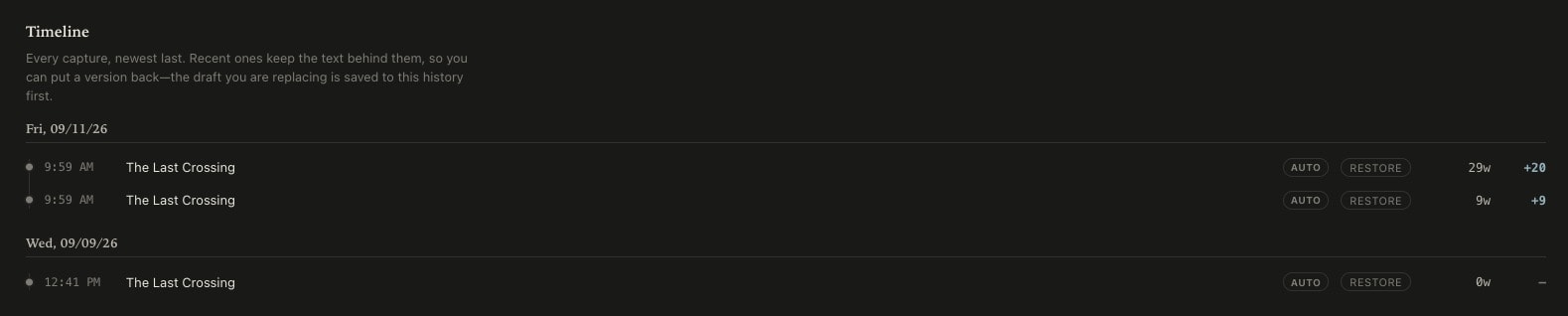
See what changed
Tell a big rewrite from a small trim at a glance.
Each entry carries its timestamp, its word count, and the change from the version before it, so a save reads as a long session, a light edit, or the afternoon you cut 2,000 words. Beside the timeline, the Writing Record shows the pace and revision behind those words, and you can export it when you need to show how a book was written.
- Every save timestamped, with its word count and the change from the one before
- Restore any of the last twenty versions in one click, and every checkpoint you took
- Compare an opening you rewrote three times without keeping three files
- A Writing Record beside the timeline shows the pace and revision behind the words
- Export the record when you need to show how a book was written
Writing history
Scene by scene
Restore one scene without disturbing the book around it.
A snapshot belongs to the scene or chapter it came from, so going back to Tuesday’s version of chapter nine leaves everything you have written since untouched. The rest of the manuscript stays exactly as it is. A restore also captures the text it replaced, so changing your mind about changing your mind costs nothing.
What is kept
The timeline is complete. The text behind it is capped.
Every capture stays in the history with its timestamp and its word count, so the record of how the book was written is whole for as long as the scene or chapter it belongs to is. The prose behind those entries is another matter: the twenty most recent versions of a scene or chapter keep their text, and so do the fifty most recent checkpoints you took deliberately or that a restore created. Older entries keep their place in the timeline and lose the text, which is the trade for a history that does not grow without limit. Twenty versions is further back than a rewrite has needed to reach, and the ones you marked yourself outlast all of them.
Ideas, Writing, Creative Vibing, Compiling, and Marketing: One Tool.
Calamus is in Beta testing; join the waitlist, learn about how Calamus will help you grow as a writer, and be the first to know when you can start writing and publishing with Calamus.