Last updated 9 September 2026. Every procedure below may be carried out by you from within the application without contacting us. Where you would prefer that we act on your behalf, the procedure for requesting that is set out in the final section. This notice should be read together with the Privacy Policy, which states what is collected and the basis on which it is held.
Deleting a chapter, scene, or research source
Delete the item from the Binder or from Research. It is moved to Trash, where it remains recoverable, with the remaining period displayed, from that book’s Settings under Deleted Items, for 30 days.
After 30 days a scheduled process running daily at 03:00 UTC removes the item from Trash. A chapter or scene is written into Archive as a complete snapshot, which begins a second period of 30 days. A research source is deleted permanently at that point, Research having no Archive tier.
Selecting Delete forever in the Deleted Items list ends the first period immediately but does not bypass the second: a chapter or scene is moved directly into Archive and the second 30-day period begins at once. Deletion is final only on selecting Delete forever within the Archive section, after which no recovery is possible.
The Drafts and Ideas bucket is not subject to automatic purging. Items placed there are retained until you remove them.
Deleting a book
Delete the book from its pen name dashboard. It is hidden immediately and remains recoverable from the Archived Books list for 30 days, after which the scheduled process deletes it permanently together with everything filed under it: the Binder tree, every scene and its text, Codex entries, snapshots, moodboard items, and research. Delete forever in that list performs the same deletion immediately. There is no Archive tier for a book, so deletion of a book is final at that point. The cascade is enforced by the database rather than by application code.
Disconnecting a social account
Two separate credentials govern access, and only one is held by Calamus. Both should be addressed.
In Calamus. Open Settings, select Social, locate the pen name to which the account is connected, and select Disconnect on that account. The record is deleted outright, together with the encrypted credential and its initialization vector, and no further post is transmitted to that account.
On the platform. Disconnecting causes Calamus to discard the credential but does not revoke it. A Bluesky app password remains valid until revoked in Bluesky’s own settings, under Privacy and security, then App passwords, at bsky.app. Revocation there is what terminates the access. It does not affect your account password and does not sign you out elsewhere. The two steps may be performed in either order.
If Threads publishing is enabled for your account in future, the same two steps apply: disconnect in Calamus to delete the stored token, and remove the Calamus application in your Threads or Instagram account settings to revoke it at source.
Posts already queued are held separately from the credential. Cancel any you do not wish to be sent from the social queue; a canceled item is not transmitted.
Revoking a recognized device
Open Settings, select Security, and select Revoke beside any entry in the Recognized devices list. That device must complete verification again before it can reach your content. A device also ceases to be recognized automatically 30 days after it was verified.
The record is not removed from the list. It is retained and marked revoked or expired, so that the history of access to the account remains available. The revocation is itself recorded in the security log, together with the IP address and user agent that performed it.
Deleting your account
Open Settings, scroll to Danger Zone, enter your password, type DELETE in the confirmation field, and select Schedule account deletion. Both the password and the confirmation are required: the first authenticates the request, the second confirms intent.
Deletion is then scheduled for seven days later, and a message containing a cancellation link is sent to the address on the account. Nothing is removed during that period and sign-in continues to function. On expiry of the period the deletion is executed and cannot be reversed or recovered.
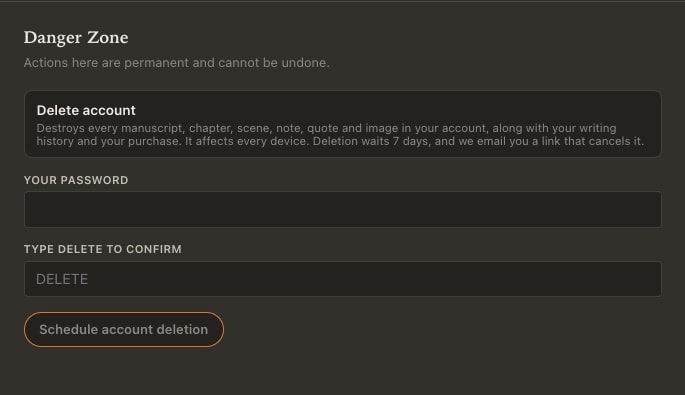
Deletion of the account removes all content within it. Every book, chapter, scene, pen name, Codex entry, snapshot, moodboard item, research note, idea, and connected social account is removed by the database as part of the same operation. No separate step is required of you, and no book need be deleted beforehand.
Uploaded images are removed also. Covers, author photographs, character portraits, moodboard images, scene dividers and desk backgrounds are stored as files rather than as database records and are therefore outside the database cascade; a separate process empties everything filed under your user identifier in the image store immediately after the account itself is deleted.
That process runs after the account deletion rather than before it, and a failure within it is not reported back to you. This is deliberate: the deletion you requested must not be blocked, or reported as failed, because a storage operation timed out. The consequence is that a storage failure may leave a file in place with no account referencing it. If you wish to confirm removal in such a case, write to us and we will remove it.
Two categories of file are held in a different store and are not deleted with the account: screenshots attached to a support ticket, and any full-project export archive for which we have sent you a link. Both are held in private storage that will not serve a file to a person who does not own it, and an export link ceases to function 24 hours after it is sent, but the files themselves are retained until we remove them. They will be removed on request.
Export your content before deleting the account. No restoration is possible afterward. Export is available in Settings under Backups.
Leaving the waitlist
If you joined the launch waitlist but did not create an account, the only data held is your email address, in our mailing list system. Use the unsubscribe link in any message from us, or write to the address below and request removal.
Requesting deletion by us
Write to support at calamusapp dot com from the address on the account, stating what is to be deleted: a connected social account, a specified book, or the account in its entirety. Sending from the address on the account is how the request is authenticated. We confirm in writing on completion.
Records retained after deletion
- The record of a purchase, retained as the record of a transaction, as required for accounting and tax purposes. Stripe additionally retains its own transaction records under its own policies, which are not within our control.
- The record of a refund, comprising an email address, a payment reference and the relevant dates, which survives deletion of the account to which it related. It evidences what was sold and refunded and gives effect to the restriction on repurchase. It contains no part of your content. The consequences of a refund, including the seven-day export period, are set out in clause 7 of the Terms of Service.
- Rate-limiting counters, which are short-lived by design and expire within minutes or hours.
- The security log, which survives deletion of the account it describes. It records sign-ins, failed sign-ins, device verifications and revocations, export downloads, connection and disconnection of social accounts, the deletion itself, and refunds, each with the originating IP address, resolved country, and user agent. A chargeback may be raised after an account has been deleted, and this log is the record by which such a claim is answered. Records are retained indefinitely and cannot be deleted, but the IP address in a record is truncated after 24 months so that it can no longer be associated with a particular connection. The log contains no part of your content, and an email address involved in a failed sign-in is stored as a keyed hash rather than in plain form. Every field is listed in the Privacy Policy.
- Material already published to a third-party platform. Once transmitted, a post resides on that platform under your account and must be deleted there.