The short answer: Scrivener and Calamus organize a manuscript in almost the same way, and they diverge at the point where the manuscript becomes a book. Scrivener hands that off for a formatting software to handle a fully-formatted paperback/hardcover book. Calamus does not—everything is built in-house.
That's the main thing we needed to change for our writing process, because things were just getting too messy working in Scrivener and then handing off to Vellum. Plus we needed more features. And because Scrivener hasn't exactly been on the ball with regular substantial updates, we had to build things from scratch for a whole process to work from the beginning to the reader.
What Both Tools Share
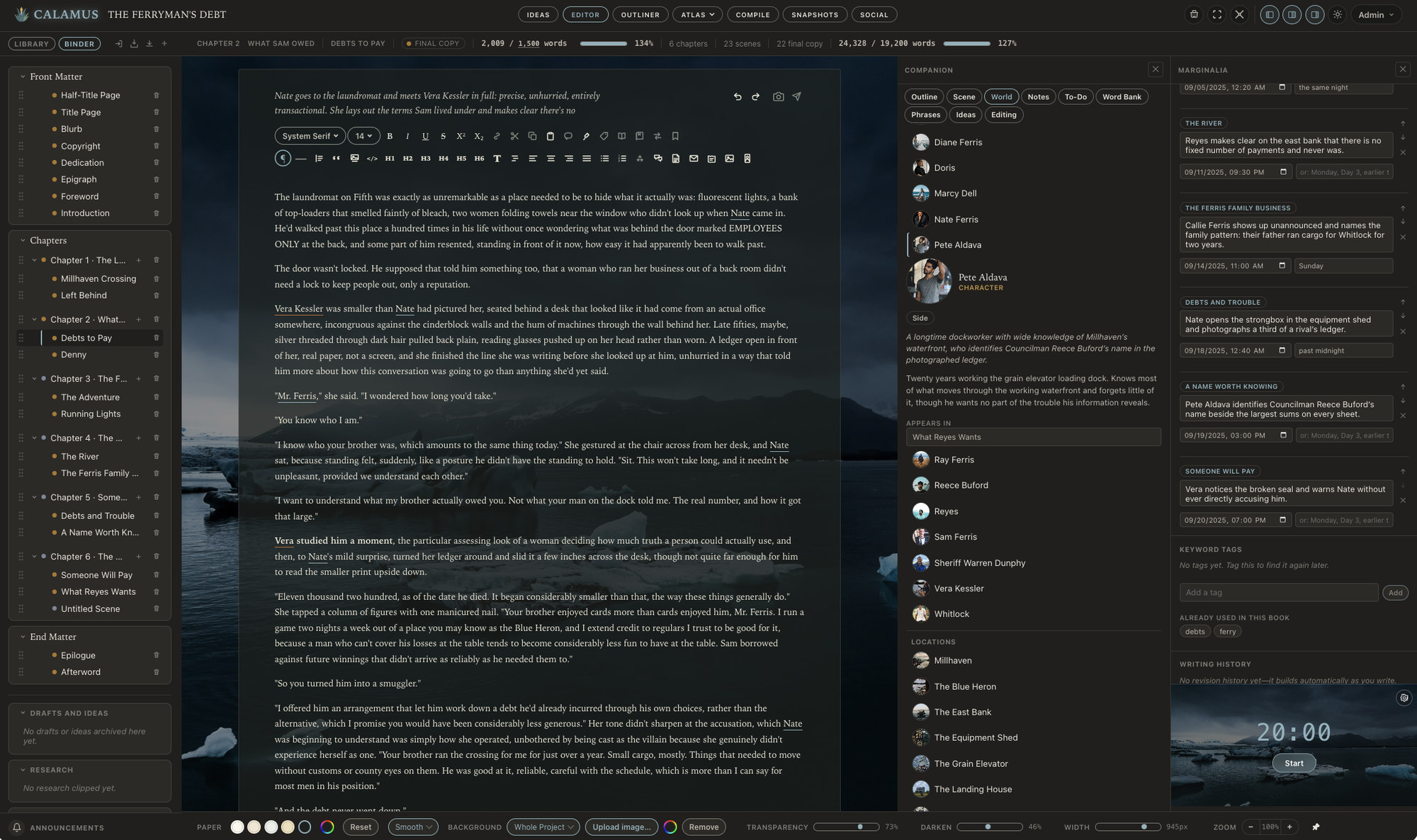
Scrivener established the model that serious long-form software has used since: a Binder of individual scene documents rather than one enormous file, a Corkboard for arranging those documents as cards, and an Outliner for seeing them as rows with metadata. That model is close to 20 years old and it has held up; for a novel of any length it is still the most workable way to organize the work.
Calamus has all three, with the same behavior you would expect from them. Binder, Corkboard, Outliner. Both tools also give you Snapshots, so an earlier version of a scene is always recoverable, and both have a Typewriter Mode that keeps the current line in a fixed position while you write.
There is one small difference in the distraction-free family. Scrivener offers Composition Mode, a full-screen editor with the interface hidden. Calamus has both a Focus Mode and a Composition Mode, which are separate things: Focus dims everything except the paragraph or sentence you are working in, Composition takes over the screen. If you have wished Scrivener's Composition Mode also narrowed your attention within the page, that is the gap.
One of the things Melody needed when drafting was access to what we built as the Companion—she needed to reference the outline, other scenes, the world build, notes, etc. And the Inspector on Scrivener just wasn't giving her that. With Calamus, you can have as little or as many Companion panels up in Composition mode as you need. So still distraction free, but available to reference without having to keep going back to find something in a different mode or view.
Import and export are close. Scrivener imports DOCX, RTF and more; Calamus imports DOCX, RTF, Markdown and TXT. Both export EPUB, PDF, DOCX and Markdown. Both let you write as many books as you want.
Sync
Scrivener syncs through Dropbox or iCloud. You set up the folder, you keep the same folder across machines, and you make sure the sync has finished before you open the project on the other device. It works, and a lot of people have run it for years without incident. It is also a step you own: if the sync is mid-flight when you open the project, you get a conflict, and untangling a conflicted Scrivener project is genuinely fiddly.
Calamus syncs through your account, built in. There is no third-party folder to configure and no rule about waiting for a spinner before you open the book somewhere else.
iPad and iPhone
Scrivener has an iOS app and it is well regarded. It costs $23.99 on top of the desktop license, and it is the same $23.99 whether you want it on the iPad, the iPhone, or both.
Calamus includes iPad and iPhone in the price. Calamus Ideas for iPhone is built around capture: a note you capture on your phone syncs into the book, so the thought you had away from your desk is in the Binder when you sit down. That is the arc the tool is designed for, from an idea captured anywhere through the draft, the world, the formatted book and the marketing assets.
One honest caveat in the other direction. Scrivener runs natively on Windows today. Calamus is native on Mac, iPad and iPhone, and runs in the browser everywhere else, which includes Windows and Linux; a Windows build is planned for 2027. If you need a native Windows binary in 2026, Scrivener has one and Calamus does not (but will soon enough.)
Typefaces and the Print PDF
Scrivener uses the fonts installed on your system. That is fine for a manuscript, and it is a problem for a book you sell, because a system font is not necessarily licensed for embedding in a commercial EPUB or print PDF. Checking that license is your job, and it is the kind of job that is easy to skip.
Calamus offers more than 1,900 typefaces at Compile, all licensed for embedding in books you sell, and ships twenty-nine of them inside the app so the desktop build renders the same book offline. You are choosing from a library rather than auditing a license.
The larger difference is the print PDF. Scrivener's print output is limited at real trim sizes; it will produce a PDF, but building a book interior at 5.5 by 8.5 inches with a gutter sized to the page count is not what the Compile presets are shaped around. Calamus's Compile produces print PDF at real trim sizes alongside EPUB, DOCX and Markdown, from the same manuscript you have been drafting. There is more detail about how that works on the Compile page.
This is the handoff in the title. In Scrivener, the interior is built in another application after you export. In Calamus, it is a property of the project.
World Building: Folders Versus Typed Categories
Scrivener handles world building with folders and document templates. You make a Characters folder, you build a character sheet template, you duplicate it for each new person. It is flexible, and flexibility is genuinely its strength: you can model anything, because it is just documents. But it's not a database.
The cost is that nothing is typed. A character sheet is a document that happens to have headings you wrote. Scrivener cannot tell you which scenes a character appears in, because it does not know that document is a character.
The Calamus Codex has 14 categories, each with its own fields: Characters, Locations, Factions, Magic Systems, Lore, Cultures, Languages, Timeline, Glossary, Lineages, Regions, Maps, Storylines and Items. Because entries are typed, they can be linked from the prose, and the relationships between them can be drawn as a map rather than described in a document. Scrivener has no relationship map.
Calamus also has a Moodboard, for the reference images and visual direction that otherwise live in a folder on your desktop. Scrivener has no equivalent, and neither does anything else in this comparison.
Updates
Scrivener's update policy is partial. Point releases are free; major versions are a paid upgrade. That is a normal and defensible way to fund 20 years of desktop software development, and it has clearly worked.
Calamus updates are included. One purchase, and later versions arrive without another charge for modules available at the time of purchase.
Price, honestly
Scrivener is $59.99 per platform, with iOS at $23.99 on top. Across five years, covering every platform, that comes to roughly $122.
Calamus is $189 one-time, which covers Mac, iPad, iPhone and the browser, with updates included and no subscription. Over the same five years, Calamus costs about $67 more, but also offer more with integration, Calamus Ideas for iPhone to get ideas loaded, and social media posts pushed out.
But the scope is not the same. Scrivener is a manuscript organizer, and an excellent one; the formatted book is produced elsewhere, in software you buy separately. Calamus covers drafting, the Codex, the Moodboard, Compile with print PDF at trim size, the licensed typeface library and the marketing assets, so the comparison is not one app against another but one app against a stack. So essentially you're comparing an apple to a ripe peach.
If you already own a formatter you are happy with, then you should consider to keep using it. If you do not, add the price of the second app to the $122 before you compare. The pricing page lists what each tier includes, and there is a 14-day trial where Compile is locked but your files still download, so you can test the drafting side before deciding.
Or if you simply love our layout, features, design, and want to come write and vibe with us, you're welcome to do that. We'd love to have you.
Which one to pick
Choose Scrivener if you need a native Windows application in 2026, since the Calamus Windows build is planned for early 2027, if you already have a formatting workflow you like, or if you want the deepest customization of compile output and are willing to configure it.
Choose Calamus if you want the Binder model with the formatting attached, if you write on a phone or an iPad and would rather not pay separately for it, or if your world has enough characters and places in it that folders have stopped keeping up. Or if you just want really cool software that does it all.
Both are reasonable choices, because they answer different questions about where your book gets finished.
For the wider field rather than these two in particular, see the guide to book writing software.
Chad & Melody
Co-founders of Calamus
The Calamus Team