We've been Scrivener users for years. Loved it. But as we started evaluating the system and process of getting a book to market, we realized something sad: Scrivener has become antiquated.
In the past few years, as a team of writers we've been waiting for an update from Literature & Latte with something bold or new that would help writers get from draft to a finished, formatted book file. And with the time delays between various software updates, we were left disappointed.
Scrivener's Compile produces a manuscript. A manuscript is not a typeset book, and that difference is why most Scrivener users like us have had to finish their interior somewhere else. This is a deliberate boundary rather than a defect, and its consequences show up in your calendar and time spent on moving the manuscript to a properly formatted book rather than in your file.
This post is about where that boundary sits, what happens each time you cross it, and what changes if formatting lives in the same place you drafted.
What Compile Factually Does Well in Scrivener
Compile takes every document in your Binder, applies a section layout to each one according to its type, and writes out a single file. Front matter documents get one treatment, chapter folders another, scenes another. You set that mapping once, save it as a format, and reuse it for every book you write after that.
This solves a real problem well. A novel in Scrivener is commonly 60 to 120 separate documents. Turning those into one continuous file with consistent chapter headings, correct ordering, and none of the stray formatting that arrives when you paste research in from a browser is not a small job. Compile does it reliably, and it has done it reliably for close to 20 years.
It also gives you several outputs from one source. Standard manuscript format for an agent, a clean DOCX for a copyeditor, an EPUB for beta readers, a PDF for proofing. Same Binder, different preset. That model has held up, and the Binder itself has held up better than almost anything else in writing software. Anyone telling you Scrivener is bad software is not looking at it honestly.
It's still good. It's just not taking us to the finish line in a market where paperback and hardcover copies are surging.
Where the Handoff Happens
The line falls at the difference between a manuscript and an interior.
A manuscript is a text document intended for a professional reader. One typeface, generous spacing, chapter headings that are simply larger text, page breaks in the right places. Everything about it is optimized for reading and marking up.
An interior is a typeset book. It has a fixed trim size, a text block positioned on that page with a gutter margin sized to the page count, running heads that change between verso and recto, chapter openers with real vertical rhythm, ornamental scene breaks, and a first paragraph that is set differently from the ones after it. It is a design object with rules, and retailers check some of those rules mechanically before they will print it.
Compile's print PDF output is limited in exactly this direction. It will give you a PDF. Getting a PDF that is a book, at 5.5 by 8.5 inches with a 0.75 inch gutter and correct running heads, is not what the preset system was designed around. So the standard workflow became: compile to DOCX or PDF, open the result in a dedicated formatter, build the interior there.
What Breaks in the Crossing
Five things, roughly in the order authors run into them.
Styles. Scrivener's section layouts are not Word styles, and they do not survive as a clean style sheet in every export path. What arrives in the second app is often direct formatting rather than named styles, which means the formatter cannot reliably say "every chapter heading looks like this." You end up reapplying structure by hand, or writing a find-and-replace pass to rebuild it.
Front matter. Title page, copyright page, dedication, epigraph, also-by list. In Scrivener these are Binder documents with their own compile treatment. In a book they need specific page positions, often on a recto, sometimes unnumbered, usually with their own typography. That positioning is rebuilt in the second app every time, because it is not something the manuscript file carries.
Drop caps. A drop cap is a character sized to a specific number of lines, baseline-aligned to the last of those lines, with the following text wrapped around it and the optical spacing corrected by hand for letters like A, W and T. None of that travels in a DOCX. It is built in the formatter.
Scene breaks. Most manuscripts use a centered hash or three asterisks. Most books use a small ornament with specific space above and below, and a rule about what happens when the break falls at the top or bottom of a page. Converting one to the other is a global operation you perform after the export.
Trim size. The manuscript has no trim size. The book does, and choosing it changes page count, which changes the gutter, which changes the text block, which changes where every chapter falls. This is the first decision in the formatter and it is entirely absent from the file you handed it.
What it Costs You, and When
The first pass is not the expensive one. Building an interior once, carefully, is satisfying work, and a good formatter makes most of the decisions for you.
The cost is in the second, fourth and ninth passes.
Your copyeditor returns the manuscript. You accept the changes in the Binder, because that is where the book lives and you are not going to maintain two masters. Then you compile again, and the new file has none of the interior work in it. The drop caps are gone. The ornaments are hashes again. The front matter is back to plain pages. You redo the pass.
Then a proofreader finds 14 more errors after you have already built the interior, and you face a real choice: fix them in Scrivener and rebuild the interior, or fix them in the formatter and let your Binder drift out of sync with the published book. Both options cost something. The second one costs more later, when you write the sequel and the canonical text of book one is sitting in a file you no longer draft in.
For us as a team, when we got edits back, or found small errors, we found ourselves making the corrections in Vellum instead of the Scrivener file, creating discrepancies between the two copies. Because we'd rather just fix the fully formatted copy rather than have to re-import everything again.
Multiply that by a series. Three books, four rounds of revision each, one interior rebuild per round. That is the actual price of the handoff, and you'll pay dearly every single time. It's a broken haphazard process.
What Changes When Formatting is Not a Separate App
If the interior is built from the same document you drafted, the rebuild disappears. You fix the typo in the scene, and the book already knows about it. The trim size, the gutter, the drop cap style and the scene ornament are settings on the project, not work you performed on a downstream file.
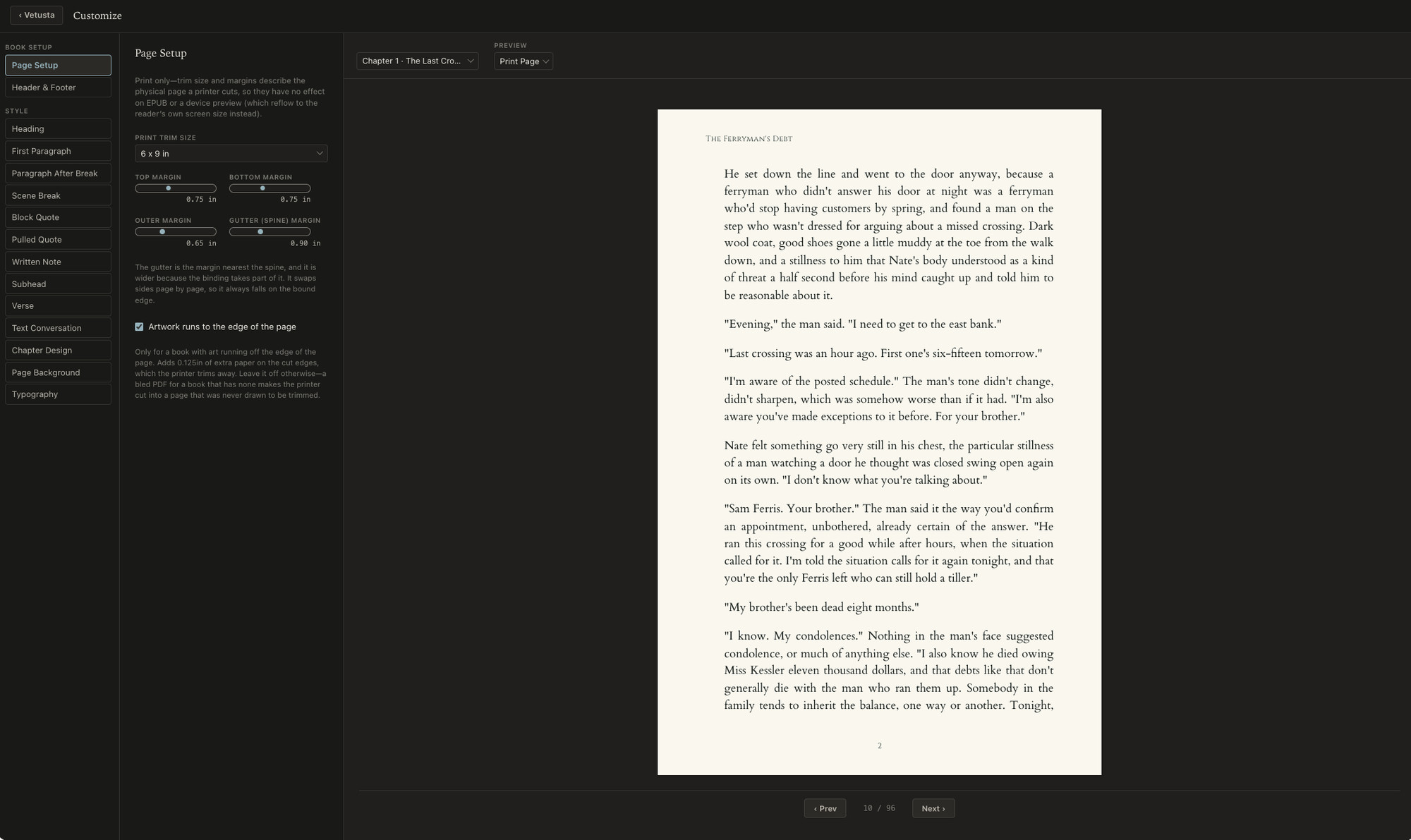
That is the design behind Calamus's Compile. Your Binder is the manuscript, and Compile renders it directly to EPUB, print PDF at real trim sizes, DOCX and Markdown. The typography is not reapplied after each revision because it was never applied to a copy; it is a property of the book. Typefaces come from a library of more than 1,900 faces licensed for embedding in books you sell, so you are not separately sourcing a license for the display font on your chapter openers.
The practical effect is that revision stops having a formatting tax attached to it. You can proof the print PDF, fix nine things, and regenerate the PDF in the same sitting without rebuilding anything.
So What Should You Actually Do
If you are happy in Scrivener and you publish one book every year or two, the handoff is a fine cost to pay. Compile to DOCX, format in a dedicated tool, and accept that you will redo the interior when the copyedit lands. Plenty of good books ship this way. (But then you'll miss all of the super cool features of Calamus!)
If you are writing a series, or you revise more than twice per book, look at how much of your production time is spent rebuilding an interior you already built. If it is more than an afternoon per pass, a tool that formats in the same place you draft is worth evaluating. We wrote up a longer feature-by-feature account of that comparison on the Scrivener alternative page, including what Scrivener does that other tools still do not.
Either way, the useful question is how many times you intend to build the same interior.
If you are choosing a tool rather than working around the one you have, the guide to book writing software covers the entire market and what separates the programs in it.
Chad & Melody
Co-founders of Calamus
The Calamus Team