For a long time, Vellum has been the best-regarded book formatter on the Mac, and the reputation is earned. You import a DOCX, pick a style, and you have a print interior and an EPUB that look like they came from a publisher. The number of decisions it asks you to make is small, and the defaults it makes for you are good ones. If you own a Mac and you only need to format, it is a very short evaluation.
Three things send people looking anyway: it runs on macOS only, it costs $249, and it is not drafting software. This post covers what else formats a book well, what each option gives up, and how to judge any formatting tool regardless of which you pick.
What Vellum's Good At
Vellum produces print PDF at a variety of trim sizes and EPUB, MOBI, PDF from the same import. It ships 26 typefaces, chosen rather than accumulated, which is part of why its output looks consistent: you cannot easily make an ugly book in it. Chapter openers, drop caps, scene ornaments and running heads are handled by the style you picked, not assembled by hand. Updates are included with the purchase.
Its trial is unusually open. You can use the software indefinitely, on your real manuscript, and see exactly what your book will look like; the purchase is what releases the file. That is a reasonable way to price a tool whose output you intend to sell, and it is the same principle behind Calamus locking Compile during its own trial, with the difference that your manuscript downloads from Calamus throughout.
What Vellum Doesn't Do
Vellum has no Binder, no Corkboard, no Outliner, no Snapshots, and no world-building tools. It is not, arguably, a place to write. It imports DOCX and that is the only way text gets inside the software, which means your draft has to exist in another application and gets to Vellum as a completed file.
It also has no sync, no iPad app and no phone app. The book exists on one Mac.
And the Mac requirement is absolute. There is no Windows version, no Linux version, and no browser version. If you write on a PC, Vellum is not an option you can work around, which is why a real portion of its user base has at some point paid for a used Mac mini or rented time on one.
Alternatives to Vellum
Atticus, $147, browser-based
Atticus is a web app that runs as a PWA, so it works on Windows, Mac, Linux and Chromebook. It formats print PDF at real trim sizes, exports EPUB, PDF and DOCX, and offers more than 1,500 typefaces. It syncs, and it has a Focus Mode, so unlike Vellum you can reasonably draft in it.
What it gives up: the organizational depth. Atticus has a chapter list rather than a full Binder, no Corkboard, no Outliner, and no structured world building. Snapshots are listed as coming soon rather than shipping. Its iPad and phone support is the browser, not a native app, which matters if you write on a train with an unreliable connection. There is no free trial; the offer is a 30-day money-back guarantee, so you buy first and evaluate second.
It is $102 cheaper than Vellum and it runs on your existing computer. For a Windows author who wants formatting and light drafting in one browser tab, it is the obvious first thing to try. We have a fuller breakdown on the Atticus comparison page.
Calamus, $189 one-time
Calamus is a full writing suite where formatting is one module rather than the whole product. It is native on Mac and iPad, with Calamus Ideas for iPhone, and runs in the browser everywhere else, including Windows. Compile produces EPUB, print PDF at real trim sizes, DOCX and Markdown from the manuscript you drafted, with more than 1,900 typefaces licensed for embedding in books you sell.
Because the draft and the format are the same project, revision does not cost you a rebuild. You fix a line in chapter nine and regenerate the PDF; the drop caps, ornaments and front matter are settings on the book rather than work you performed on an exported copy.
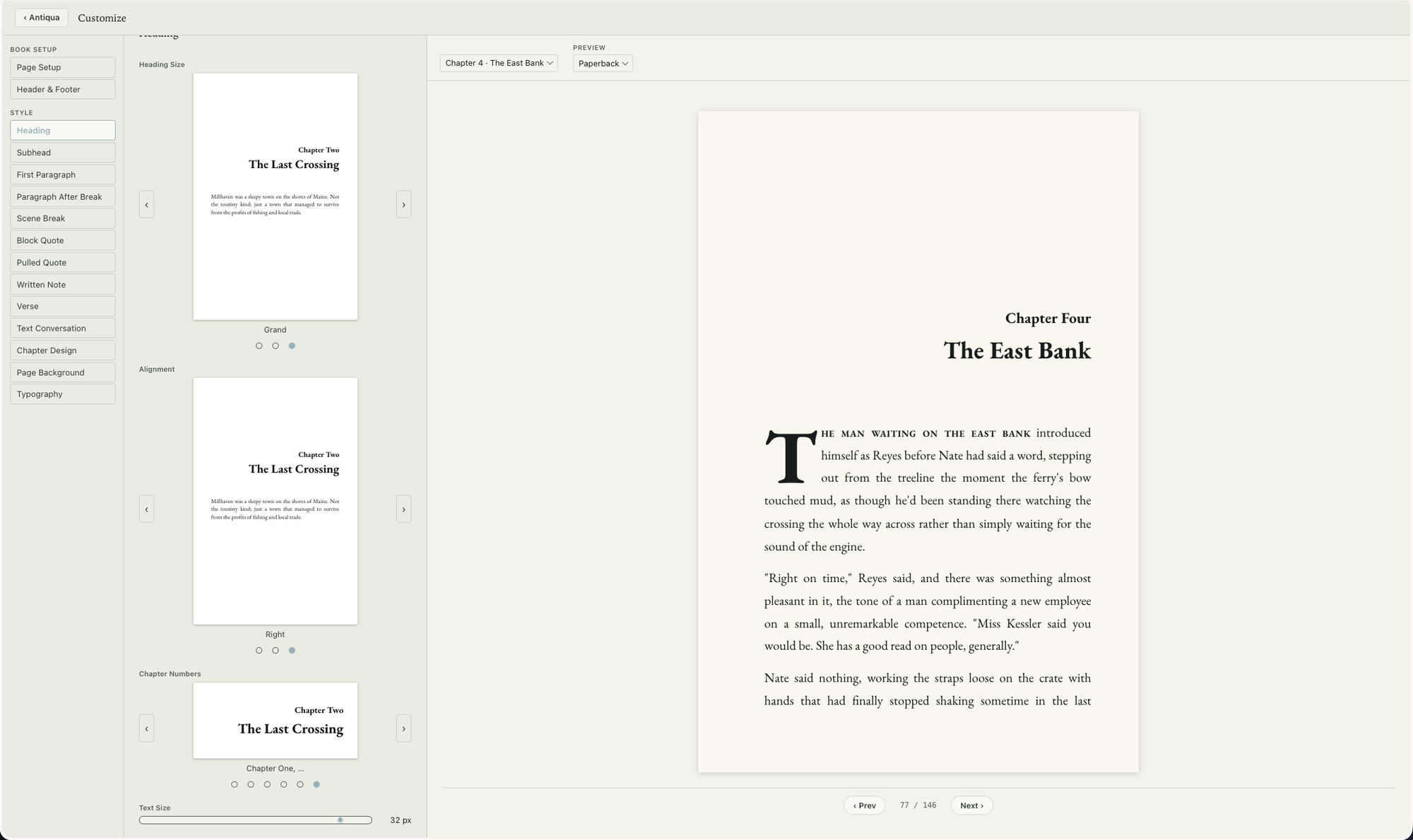
What it gives up: there is no native Windows application yet, so PC users get the browser version rather than a downloaded binary until the Windows build lands, which is planned for 2027. It is $42 more than Atticus. And the trial is 14 days with Compile locked, though your files still download during it, so you can evaluate the drafting and world-building side before you can evaluate the export.
What you get for the difference is the rest of the arc: a Binder, complete customization of your writing environment, Corkboard and Outliner, Snapshots, a Codex with 14 typed categories for characters, locations, factions, magic systems and the rest, a relationship map, a Moodboard, and note capture on your phone that syncs into the book. The features overview lists the modules individually.
Staying with Vellum
If you have a Mac and a formatting workflow that works, none of this is an argument to change it. Vellum's output quality is not in question, and $249 amortized over a long series is not much per book. The comparison truly becomes interesting if you are on Windows, if you are buying for the first time, or if the export-reimport cycle after every copyedit has become the largest chunk of your production time like it has for us. There is a longer side-by-side on the Vellum comparison page.
How to Judge a Formatting Tool
Whatever you end up using, three things separate a book formatter from a word processor with a PDF button.
Real trim sizes. The tool has to lay out at 5 by 8, 5.5 by 8.5, 6 by 9 and the other sizes printers actually accept, with a text block positioned inside that page and a gutter margin wide enough for the book's page count. If a tool only offers Letter and A4, or offers a trim size without regard for the inside margin the binding needs, it will produce a PDF that a printer rejects or a book with text running into the spine. Ask specifically whether the tool checks the gutter against the current page count, and checks it again after revision, so a book that grows past a threshold is flagged before the printer sees it.
Embeddable licensed fonts. A commercial EPUB or print PDF embeds its typefaces in the file, and embedding requires a license that permits it. Many system fonts do not. If your formatter uses whatever is installed on your machine, verifying that license is your responsibility, and a file rejected at upload is easier to deal with than a licensing problem found a year into sales. A tool that offers only typefaces licensed for embedding removes the question.
EPUB and print PDF from one source. The ebook and the paperback should be generated from the same text, not maintained as two documents. If they diverge, the correction you made to the ebook after launch will not be in the next print run, and you will not find out until a reader tells you. Check that both outputs come from a single manuscript and that regenerating one does not require rebuilding the other.
A fourth question is worth asking if you write more than one book: what happens on revision? Building an interior once is straightforward in any of these tools. Find out how much work the fifth rebuild takes, because for a series that number is the one you will actually pay.
These are formatting questions, and formatting is only half of what the software has to do. The guide to book writing software sets them beside the drafting half, which is the comparison most authors actually need to make.
Chad & Melody
Co-founders of Calamus
The Calamus Team