If you want to draft a novel on an iPad, the first thing worth knowing is that most novel-writing software are not meeting a lot of writers' needs. The industry market of writing apps largely developed solely on desktop computers, and a lot of apps and solutions stayed put in that sector of the market.
Vellum is Mac only. EmberWrite, a fairly new option, is desktop only. Codex Heim runs in a browser and has no iPad app. Atticus and Dabble both work on an iPad, but only through Safari. Scrivener has a real iOS app, and it is genuinely ok (though lacking a nice interface and updates since it launched), costs $23.99 on top of whatever you already paid for the desktop version and its sync runs through Dropbox or iCloud rather than the app's own service.
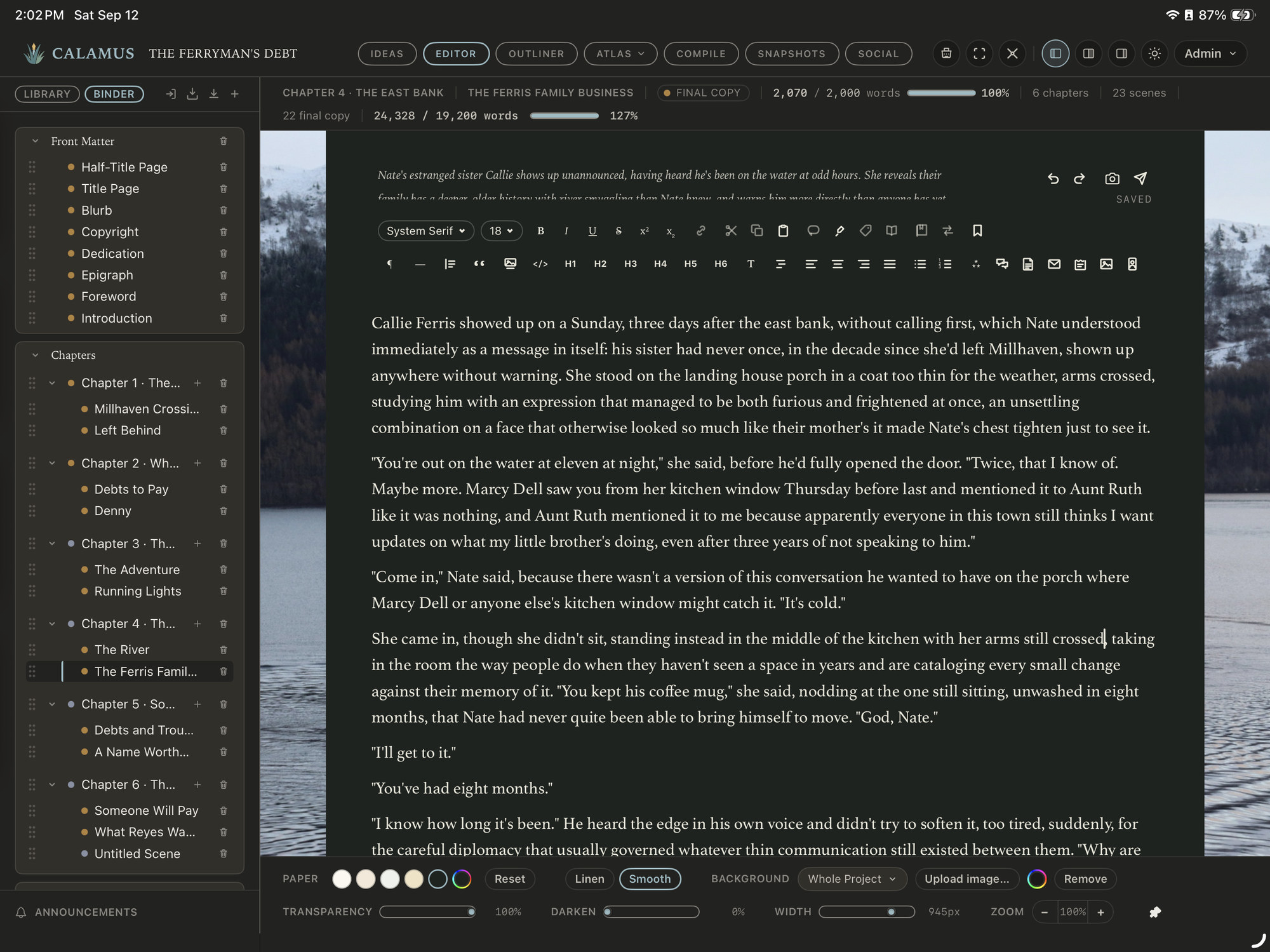
Calamus includes a native iPad app with the desktop purchase and syncs on its own; Calamus Ideas for iPhone is a capture companion rather than a place to draft.
That is the whole aspect of where Calamus is positioned in the market—to solve a major constraint a lot of writers have. The rest of this post is about what separates an iPad app you will still be using in six months from one you abandon in week two, followed by an honest look at each option.
What an iPad Writing App Has to do Before Anything Else
It has to work with no connection. An iPad is the machine you take to a library with unreliable wi-fi, a train, a doctor's office, work, a waiting room, a cabin. A browser tab that needs a live connection to load your manuscript is a different kind of tool from an app that keeps the text on the device.
Progressive web apps have improved a great deal and some of them cache well, but caching is not the same guarantee as a local file. Test this deliberately: put the iPad in airplane mode, open the app cold, and try to write 500 words and have them still be there an hour later.
It has to treat a hardware keyboard as a first-class input. Most serious drafting on an iPad happens with a Magic Keyboard, a Smart Folio, or a Bluetooth keyboard. That means the app needs real keyboard shortcuts, arrow-key and option-arrow navigation through text, select-to-end-of-line, and a cursor that behaves. It also means the app should not lose half the screen to a software keyboard that has no reason to appear. Browser-based apps are the weakest here, because they inherit whatever Safari gives them and rarely get to define their own shortcut set.
It has to handle files like a real computer. You will eventually need to get a manuscript out of the app and into an editor's inbox, a beta reader's hands, or a retailer's uploader. On an iPad that means the Files app, iCloud Drive, AirDrop, and a share sheet that works. An app that can only export by emailing you a link is a bottleneck you will hit at the worst moment.
Its sync should be its own. This is the one people underestimate. When sync is handled by a third-party service you also have to maintain, you have added a second thing that can break, another failure point, another expense and login authorization to maintain, and when it does break the failure shows up as a conflicted copy of a chapter rather than a clear error. Sync that the app owns end to end can tell you what state your project is in. Sync that is bolted on with 3rd party authorizations cannot.
Those four are the floor. Above the floor, the question is whether the app does the parts of novel-writing that are not typing: keeping chapters in order, holding your notes about characters and places somewhere you can find them, letting you rearrange scenes, and producing a finished file. A full writing suite does all of that in one place; a plain editor does the typing and hands the rest back to you.
And that's where we feel Calamus becomes a truly superior application system because allows you to be wherever whenever, writing and using your software without having to change your interface. Everything is consistent throughout your experience, no matter what device you're on.
Scrivener
Scrivener has been the serious novelist's manuscript organizer for close to 20 years, and its Binder model, a nested outline of folders and documents that also is the manuscript, has not aged. The iOS app is a real native app, not a wrapper, and it is quick and fairly decent to type in. Corkboard, Outliner, Snapshots and Typewriter Mode are all there in some form.
The costs are worth being clear about. Scrivener is $59.99 per platform (Windows vs. Mac), and the iOS app is a separate $23.99 purchase; a Mac plus iPad setup is two transactions. Sync requires Dropbox or iCloud, another expense, which you configure yourself, and the practice of closing the project on one device before opening it on another is something you learn to do. Updates are partly free but also far between: point releases are included, major versions are paid. Its export is broad, EPUB, PDF, DOCX and Markdown, but its print PDF work is limited compared with dedicated formatting tools, and it uses system typefaces rather than a licensed library.
If you already own Scrivener on the desktop and you are comfortable with Dropbox, the iOS app is the least disruptive way to write on an iPad today.
Calamus
Calamus ships native apps for Mac and iPad and also runs in a browser, with Calamus Ideas on the iPhone for capture, and the iPad app is included in the price rather than sold separately. It is $189 one time with free updates, and sync is built into the app itself, so there is no Dropbox folder to manage and no conflicted-copy problem to untangle. We built in a natural conflict resolution into the apps intentionally to help you keep the newer version of the work.
The reason to care about this on an iPad specifically is that the whole project travels, not just the text. The Binder, Corkboard and Outliner are there. So is the Codex, the structured world-building side of the app, with 14 typed categories: Characters, Locations, Factions, Magic Systems, Lore, Cultures, Languages, Timeline, Glossary, Lineages, Regions, Maps, Storylines and Items. Snapshots keep earlier drafts you can restore. Ideas captures a note on your phone and it turns up in the book. When the draft is finished, Compile produces EPUB, print PDF at real trim sizes, DOCX and Markdown, with 1,900+ typefaces licensed for embedding in books you sell.
One app system gets you from the first note through to the file you upload. The feature list covers the modules in detail.
Atticus
Atticus is $147 one time and runs anywhere with a browser: Windows, Mac, Linux, Chromebook, and an iPad through Safari. It is built as a web app, which is why it reaches so many platforms, and also why the iPad experience is a browser tab rather than an app icon. Sync is included and works.
Its real strength is formatting. Atticus has 1,500+ typefaces and produces print PDF at trim size, EPUB and DOCX, and for a lot of self-publishing authors it is the one purchase that covers both writing and producing the book. On the drafting side it is lighter: a chapter list rather than a full Binder, Focus Mode, no Corkboard, and Snapshots are listed as coming soon. There is no free trial, though there is a 30-day money-back window (often viewed as a hassle for many consumers).
Dabble
Dabble is a subscription at $19 a month, runs in a browser and on mobile, and is built as an Electron wrapper rather than a native app. From a long-term perspective, that gets expensive. On an iPad you are working in a browser. It syncs well, has a Binder, a plot grid outliner, Focus and Typewriter modes, a story bible for characters and places, and a Time Machine that keeps versions of your work.
There are two things to weigh when considering Dabble. Import is paste only, which matters if you have an existing manuscript to bring in. And there is no print PDF at trim size, so Dabble is a drafting tool that hands off to something else for the book itself. At $19 a month the five-year cost is about $1,140, though the Author plan is also sold as a $699 one-time purchase, which is worth knowing before you compare it with anything bought outright.
Codex Heim
Codex Heim is $15 a month, browser only, and has no iPad app. It is the most interesting of these on the world-building side: a structured codex, a lineage canvas that maps relationships between characters and families, an outliner, and Focus Mode. If your project is a large invented world with a lot of connected people, it does something the others do not.
Its limits are real. Export is manuscript only, so it cannot produce your finished book. Projects are capped at 10. The trial is seven days. And browser-only means the offline question above has no comfortable answer. The one thing Melody noted was that the app was super pushy about getting a book imported, and locked things down until you achieved certain goals. For a lot of writers, that's going to be annoying and also a little alarming.
Another thing of concern is as of this date of publication, the company did not have their DMCA registration publicly available on their Terms of Service nor could we find it on their site. In addition, we noted that there was no cookie, EULA, data deletion, security, or general legal disclosures on their site. (Writer beware).
Vellum and EmberWrite, for completeness
Neither of these is an iPad option, and both are worth knowing about anyway.
Vellum is $249, Mac only, and produces beautiful print interiors with very few decisions to make: 26 typefaces and a small set of book styles, which is exactly why the results look right. It has no drafting tools at all, so it is a formatting destination rather than a place to write. EmberWrite is $65, runs on Mac and Windows on Apple Silicon only (not built for Intel chips on Mac, which millions of people still rely on), is built as an Electron wrapper, keeps local files on a single machine with no sync, and has Spaces, an outliner, character and location sheets, and five automatic backups. Both are desktop propositions.
How to test an iPad setup in a week
Pick one candidate and give it a real week rather than an evening. Import an existing chapter, not a blank file, and see what makes it into your document. Write a session with the iPad in airplane mode, then go back online and confirm nothing was lost or duplicated. Move a scene from chapter three to chapter seven and see how much friction that involves. Export a DOCX and open it somewhere else. Add a character to whatever the app calls its notes and check that you can find that entry again from the iPad two days later.
If the app holds up on all five, it will hold up on a book. Calamus has a 14-day free trial with the drafting side fully open on the browser (native apps ship with a paid version), which is enough time to run that test properly. Whatever you choose, run the test before you commit a manuscript to it.
The iPad is usually the second machine rather than the first, so it is worth making this decision alongside the desktop one. The guide to book writing software compares what these tools do on a Mac and where the tablet fits into that.
Chad & Melody
Co-founders of Calamus
The Calamus Team