We've tried a lot of different kinds of writing software in our growth as writers. One of those was Atticus, as it marketed itself as an alternative to Vellum. So we thought we'd check it out last year, even though we were somewhat satisfied (though limited) with what Vellum could offer.
We're going to preface this post to let you know that we appreciate all kinds of software geared for writers—everyone has different needs and preferences, as well as budgets. There's bound to be a solution for every writer out there, and we're not saying one is going to be better for you than others. But as a team of software developers, we're here to inform you of how things run on the backend (Chad's forte) and how things interact with the user (Melody's passion and design) so you can make informed decisions best for you.
The biggest difference between Atticus and Calamus is how each one reaches your machine. Atticus is a web app, specifically a progressive web app (PWA), so it runs inside your browser and works on Windows, Mac, Linux and Chromebook. Calamus is a native app on Mac, iPad and Calamus Ideas is designed for iPhone, and the native desktop/ipad apps have a browser version to accompany it. When you're spending and investing a lot of time writing, and housing your manuscripts, we're going to be honest with you—native apps are the way to go.
That single architectural choice decides most of the rest: what happens on a plane, where your files live, what the tablet experience is, and what the app does if a server has a bad afternoon. Everything else in this comparison sits downstream of it.
Prices, so you have them up front: Atticus is $147, one-time. Calamus is $189, one-time. Neither is a subscription, and both include future updates.
Web Apps (PWA) Like Atticus
A web app has three real advantages.
It runs on whatever machine you own. Atticus works on Windows, Mac, Linux and Chromebook. If you write on a Linux desktop or a school-issued Chromebook, that list matters because most writing software simply does not run there.
Calamus is native on Mac, iPad and (Calamus Ideas) iPhone; on Windows, Linux or Chromebook you would be using the browser version, with a Windows build planned for 2027. If you have no Apple hardware at all and you need a native app this year, we would suggest trying Atticus, although many users have had some struggles fumbling with it.
There is nothing to install. You open a URL and you are writing. No installer, no admin password, no wondering whether the version on the laptop matches the version on the desktop.
There is nothing to update. The version you load is the current version. You never sit through a download, and you never end up two releases behind because you kept dismissing a dialog.
Those three things are genuinely useful, and a comparison that skips past them is not being straight with you. Some people find those factors a plus.
Native Apps Like Calamus
Around here at Calamus, we're all about protecting work. We know what it's like to have a document crash (looking at you, Microsoft), for an internet connection to drop and lose a whole blog post (ahem, Spectrum), and what working in a browser is like and those potential risks. But we're all about portability, too, and we know you don't always want to be tied to a laptop to work on formatting or writing your book. Which is why you have OPTIONS. We don't want you to lose an entire afternoon of writing just because things went offline or a server went down.
A native app is a program on your disk. Rather than list what that buys you in general, here is what Calamus actually does with it.
It opens and lets you type with no connection. The Mac and iPad apps keep your credentials in the system Keychain, so launching with no signal puts you in the app rather than at a sign-in wall. Every answer the server has given is written to disk as it arrives and read back when the network cannot answer, so a book you have opened on that machine before opens again on a plane. Your prose is written to a plain text file on disk before each save is attempted, and deleted only once the server confirms it: the window in which your words exist nowhere but in memory shrinks from "until the next successful save" to the gap before the next autosave fires. Atticus, as a PWA, has offline handling of its own; the difference is where the program lives, and on a tablet or a phone it is a browser tab.
Every other change queues instead of failing. Moving a chapter, filing a scene into Trash, renaming a book, changing a stage, editing an outline synopsis, editing a world building field: each one is tried immediately, and if the network cannot carry it, it is written to disk and replayed in order when the connection comes back. A change the server genuinely refuses stops the queue and tells you, because that is the server saying something true rather than "not yet." A network monitor wakes the queue when a connection appears, so you are not relying on noticing a badge and pressing Retry. That is what "an outage pauses sync" means here in practice: you keep writing, the work banks up on your own disk, and it reaches your account in order when the server is back.
Compile on the native app experience runs on your machine, not on ours. The EPUB3 and the print PDF are built inside the app on your Mac or iPad: the pagination, the line breaking, the running heads, the chapter openers, the zip layout a valid EPUB requires. You press generate, say where the file goes, and it is on your disk. Nothing is uploaded to be rendered somewhere else and sent back to you.
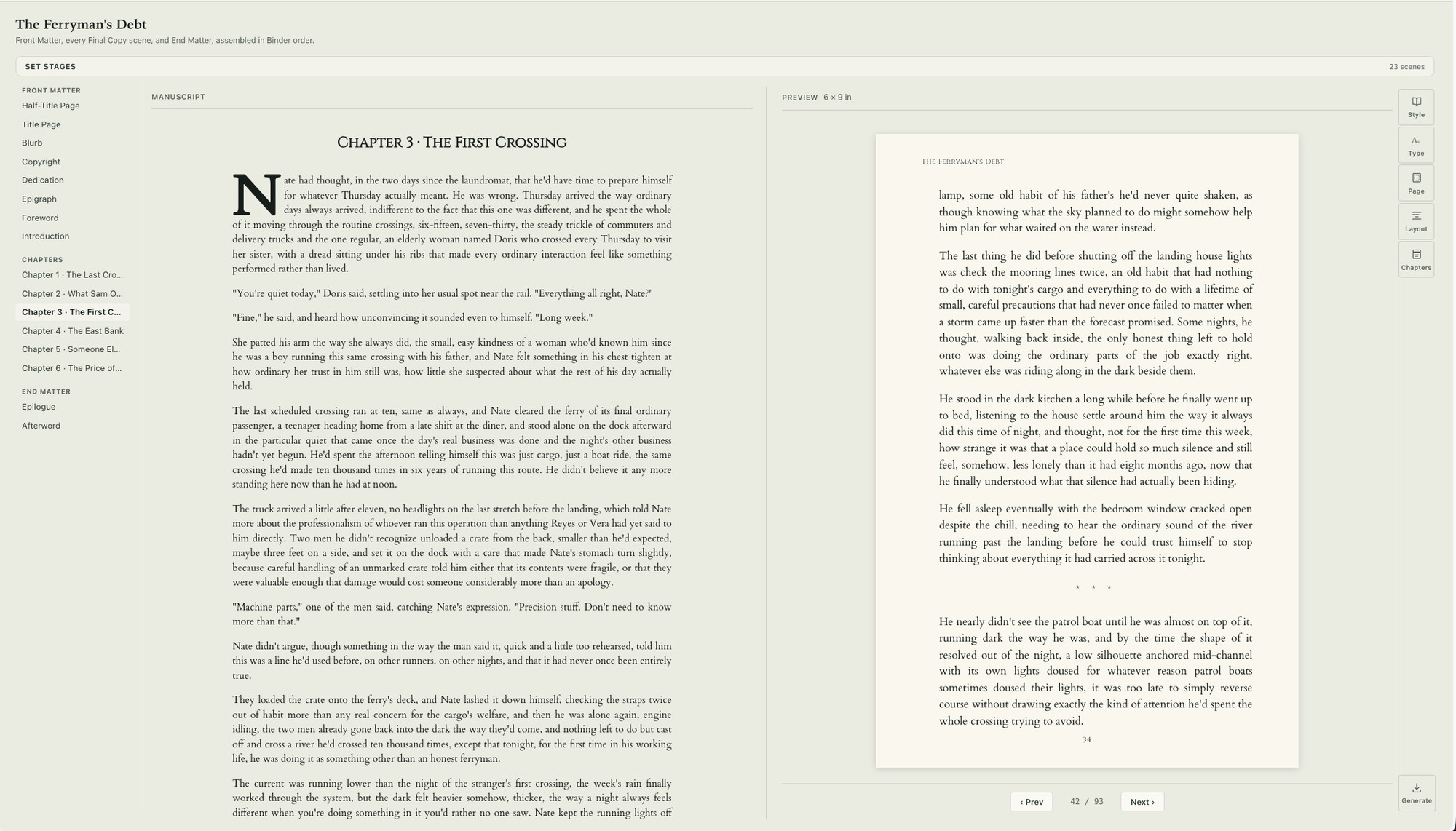
Two things we are not going to claim. Your manuscript is not a document you go and open from Finder; it lives in your account, syncs between your Mac, your iPad and Calamus Ideas on your phone, and the app keeps a local copy of the parts you have open. And backups, DOCX manuscript downloads and writing record exports are built on the server and then saved wherever you point them, so those do need a connection. What sits on your disk is the app, that local copy, and every book you compile. This enables you the luxury of full portability so you can literally work from anywhere.
Neither model is correct in the abstract. If your machine is a Chromebook, the web app model wins by default (but only until Calamus offers a Windows/Linux version). If you write on a train with patchy signal, or on an iPad somewhere with no wifi, the native model wins.
Tablets and Phones for Writing Apps
Atticus on an iPad is the browser. Same for a phone. It works, and for light editing that may be all you need or want to have.
Calamus ships an actual iPad app, included in the $189, and Calamus Ideas on the iPhone for ideas, notes, quotes, and writing log capture. Sync is built in rather than arranged through a third-party service (like Scrivener, for example). The intended result is that you catch an idea on your phone, it lands in the book, and it is there when you sit down at the Mac, iPad, or browser when you're ready for another writing session.
If you have never wanted to write on a tablet, this section costs you nothing either way. If you have wanted the freedom to write on your tablet using the same interface as your Mac, it is probably the deciding section on what is best for you. (Go Calamus!)
Structure Tools
This is where the two apps diverge the most.
Atticus organizes a book as a chapter list. It has Focus Mode. It does not have a Corkboard, an Outliner, or a structured story beat or World Building, no companion apps. It has no relationship map and no moodboard.
Calamus has a Binder, a Corkboard, an Outliner, Typewriter Mode and Focus Mode, plus a structured Codex with 14 categories: Characters, Locations, Factions, Magic Systems, Lore, Cultures, Languages, Timeline, Glossary, Lineages, Regions, Maps, Storylines and Items. Each category has its own typed fields rather than a blank note. There is a relationship map and a moodboard as well.
Whether that gap matters depends entirely on what you are writing. A memoir or a business book may never need a faction registry. A secondary-world fantasy across four books usually does, and if Atticus does not carry that material, it lives in a second app and you keep the two in step yourself. Our fuller writeup on that split is at the Atticus alternative page.
Earlier Drafts
Atticus lists Snapshots as coming soon. Calamus has Snapshots now along with authorship proof that your writing is your own: you take one before a big revision and you can restore the earlier version later.
If you revise hard or go back and forth on how a scene or a chapter should go, this is the feature you notice the absence of only once, at the worst possible time. Version history is not glamorous, but it is the difference between an experiment you can try and an experiment you have to be sure about first.
Sure, there's always the option of creating a second document, as well. But what if you don't think to do that until you've already changed the entire scene? Team Calamus has planned for moments like that, because we've been there.
Typefaces and Finished Files
Both apps take formatting seriously, and this is Atticus's strongest ground.
Atticus has 1,500 or more typefaces and produces a print PDF at real trim sizes, plus EPUB and DOCX. That is a real formatting tool, not an afterthought bolted onto a text editor, and it is the reason a lot of authors bought it.
Calamus Compile offers more than 1,900 typefaces, licensed for embedding in books you sell, and exports EPUB, print PDF at trim size, DOCX and Markdown. The extra Markdown export matters if you keep a plain-text archive or hand files to a collaborator who works that way. The publishing sphere is becoming much more Markdown friendly due to the size of documents and portability for those who no longer want to deal with Microsoft with the variety of issues including privacy. There is more detail on how that output is produced on the Compile page.
Import is a mild difference too. Atticus imports DOCX. Calamus imports DOCX, RTF, Markdown and TXT. If your existing drafts are RTF out of an older program, that saves a conversion step.
Trying Before You Buy
Atticus has no trial. It has a 30-day money-back guarantee instead, so you buy first and get your money back if it is wrong for you.
Calamus has a 14-day free trial. Compile is locked during the trial, but your files still download, so you can test the drafting and structure tools with your own manuscript before deciding. We don't request a card on file or bill you automatically when your trial is over. So there's no panic "oh I need to make sure I cancel the trial if it's not for me" moments.
Money-back and trial both get you to the same place eventually. Ours is just easier and less hassle. A trial just gets you there without a charge on the card in between.
Which one fits
Consider Atticus if you write on Windows, Linux or a Chromebook, want a one-time purchase that handles a manuscript and produces good retail files, and would rather not wait for the Calamus Windows build planned for 2027. It is well-built, it is $147, it covers hardware most competitors ignore, and if you do not need a corkboard or a story bible you are not paying for one.
Buy Calamus if you work on Apple hardware, want the iPad and phone apps included rather than a browser tab, want to draft with no connection, and want the structural side, Corkboard, Outliner, Codex, Snapshots, in the same app that produces the finished EPUB and print PDF.
The honest summary is that these tools overlap on formatting and diverge on everything before formatting. Atticus is a strong finishing tool that also drafts. Calamus is built to carry a book from the first note through the world-building and out to the retailer files without a handoff. If you ask us, we think Calamus is designed for more creative types who write with vibes, moods, level of attention needs, and we have built it so that you can use themes for each and every book, and truly personalize your experience. We also like the Social module, which helps you market your book as you go. Which of those descriptions sounds like your project is the answer.
If you are still narrowing the field rather than deciding between these two, the guide to book writing software covers the whole category and the two jobs any of it has to do.
Thanks for reading!
Chad & Melody
Co-founders of Calamus
The Calamus Team