Novel writing software
Write the book and publish it without changing programs.
Most novel writing software stops at the draft: you keep the world in a second app and pay a third to typeset the result. Calamus is all three on one file. Capture the idea, draft it, build the world around it, then compile a retailer-ready EPUB or print PDF from the same manuscript you have been writing in all along.
Mac, iPad and any browser. Your manuscript exports as DOCX, RTF, Markdown or plain text whenever you ask, so nothing you write is ever trapped in here.
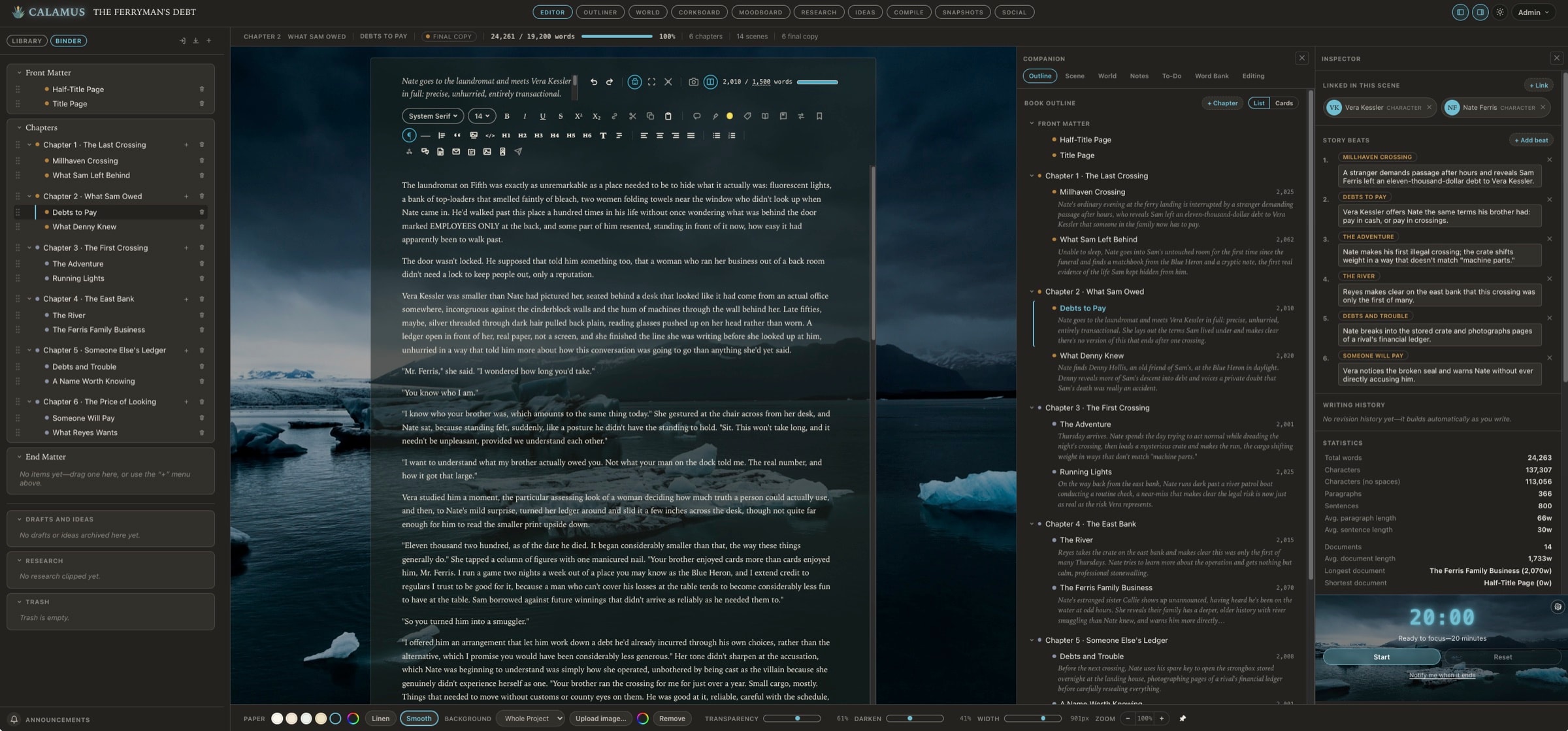
- Binder
- Outliner
- Corkboard
- Codex
- Moodboard
- Research
- Snapshots
- Marginalia
- Typewriter Mode
- Focus Mode
- Composition Mode
- Compile
- Writing log
- Word bank
What Calamus is
Novel writing software that carries the whole book
Calamus is a writing application for novelists, built around a single project file that holds the manuscript, the outline, the research and the world beside each other. It is not a word processor with folders bolted on, and it is not a formatter you hand a finished draft to. It is the place the book lives from the first sentence to the file a retailer accepts, on iPadOS, macOS and in your browser.
Draft
A manuscript you can see all of at once
The Binder holds every chapter, scene and note in one project, so moving a scene is a drag rather than a copy, a paste and a rename. Three writing modes get progressively quieter as you need them to: Typewriter keeps the line you are on at eye level, Focus dims everything but the sentence, and Composition takes the screen.
- Binder, Outliner and Corkboard on the same file, never a second copy
- Marginalia sits beside the line it belongs to, not at the end of the chapter
- Snapshots keep the version you talked yourself out of
- Word goals by chapter, and a writing log that records what actually happened
World-build
The name you invented in chapter 2 is still the same name in chapter 31
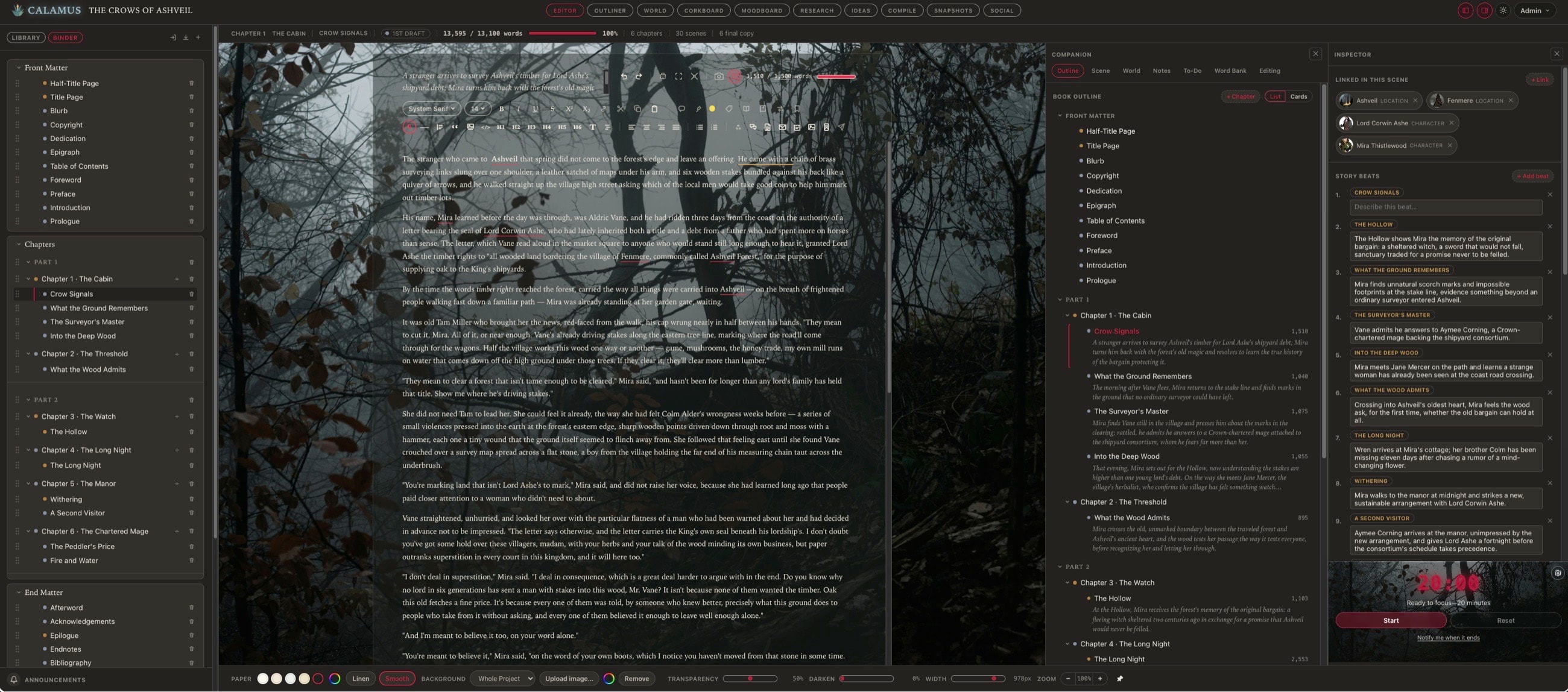
The Codex holds characters, locations, factions, magic systems, lore, cultures, languages, timelines, glossaries, lineages, regions, maps, storylines and items, each entry linked to the scenes that mention it. A continuity question is a click, not a search through a spreadsheet you stopped updating in March.
- Every entry links back to the scenes it appears in
- Relationship maps drawn from the entries themselves
- A moodboard and a research shelf filed against the chapter that needs them
- It travels with the manuscript, because it is part of the same project
Publish
Compile the file the store actually takes
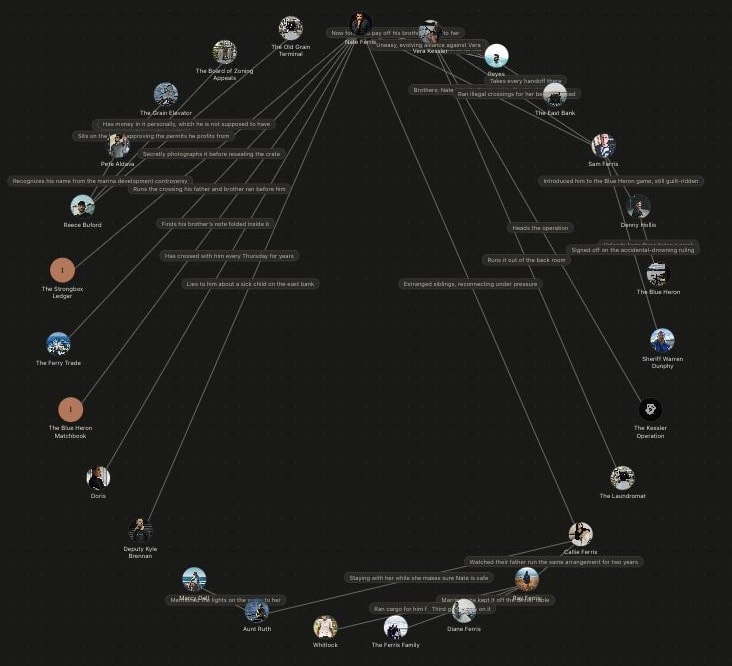
When the draft is done, Compile typesets the same file you wrote in. A paginated EPUB for the ebook, a print PDF at a real trim size with bleed and gutter where the printer wants them, and a manuscript format an editor expects to receive. No export, no re-import, no second program to buy.
- EPUB 3 and print PDF, at every retailer trim size
- More than 1,900 Google typefaces, licensed for embedding in a book you sell
- Front matter that numbers itself, and heading styles that hold
- DOCX, RTF, Markdown and plain text whenever you want them
Who it is for
Written for the novelist who is also the publisher
The series writer
Six books, one world, and a cast that has to stay consistent across all of them. The Codex is the reason book four does not contradict book one.
The self-publisher
You are the author and the production department. Compile removes the step where a finished draft goes out to a formatter and comes back as someone else's file.
The planner, and the pantser
Outline first on the Corkboard, or write first and let the outline assemble itself from what you wrote. The same project supports both, and most writers do some of each.
Anyone paying for a stack
A drafting app, a formatter, a notes app and a spreadsheet, each with its own copy of the truth. One purchase replaces the row of them.
Why Calamus
Next to what you are probably paying for now
Every tool in this table is good at what it was built for, and two of them we would still recommend in the right situation. What none of them does is carry a book from the first idea to a retailer-ready file without handing it to another program in the middle. Read the row that matters to you rather than the count of checks.
One purchase, or two
What you get, next to what you’d otherwise buy.
Every product here is one an author is choosing between for the whole job: writing the book, and producing the file a store will accept. Tools built for one part of that, like Campfire and World Anvil for world building or Plottr for plotting, are not compared here. Prices are the vendors’ own published figures, checked in September 2026.
One row needs a word of explanation. The phone app is Calamus Ideas, and it is a companion rather than a small copy of the desktop app: it provides Ideas, the Focus Timer, Quotes and social sharing, and what you capture on it syncs into the book. You can write in the ideas and notes it keeps, and some people do, but drafting a novel happens on the Mac, the iPad or in the browser. Scrivener’s iOS app is a full manuscript editor, and on that row it does something Calamus does not.
| Feature | Scrivenerone-time | Vellumone-time | Atticusone-time | EmberWriteone-time | Dabblesubscription | Codex Heimsubscription | Calamusone-time |
|---|---|---|---|---|---|---|---|
| Where you can write | |||||||
| Platforms | Mac, Windows, iOS | Mac | Windows, Mac, Linux, Chromebook | Mac, WindowsApple Silicon only | Browser, mobile | Browser | Mac, iPad, iPhone, browseriPhone runs Calamus Ideas; Windows and Android planned for 2027 |
| How the app is builtA real program on your computer, a website wrapped in one, a website with its own icon, or a browser tab | Nativea real program on your computer | Nativea real program on your computer | Web appa website with its own icon (PWA) | Wrappeda website inside a desktop program (Electron) | Wrappeda desktop program that loads the website (Electron) | Browser onlynothing to download | Native and browsera real program, plus the web |
| Runs in a browserNothing to install | – | – | ✓ | – | ✓ | ✓ | ✓ |
| Write on your iPadNative app, not a browser tab | Yes$23.99 extra | – | Browser only | – | Browser only | – | Yesincluded |
| Write on your phoneNative app, not a browser tab | Yes$23.99 extra | – | Browser only | – | Browser only | – | Ideas and notesCalamus Ideas, not full drafting |
| Sync between your devicesWithout a third-party service | Dropbox or iCloud requireda long-running source of sync trouble | – | ✓ | Nolocal files, one machine | ✓ | ✓ | Yesbuilt in |
| Getting it read | |||||||
| Pull a quote while you draft | – | – | – | – | – | – | ✓ |
| Schedule posts to Bluesky | – | – | – | – | – | – | ✓ |
| Share buy links from your phone | – | – | – | – | – | – | ✓ |
| Your files | |||||||
| Importing options | DOCX, RTF, more | DOCX | DOCX | ? | Nopaste only | DOCX, TXT, RTF | DOCX, RTF, Markdown, TXT |
| Exporting options | EPUB, PDF, DOCX, Markdown | EPUB, MOBI, PDF, DOCX | EPUB, PDF, DOCX | ePub, PDF, DOCX | DOCX, PDF, Markdown | Manuscript only | EPUB, PDF, DOCX, Markdown |
| Typefaces supported | System | 26 | 1,500+ | – | – | – | 1,900+ |
| Print PDF at real trim sizes | Limited | ✓ | ✓ | Manuscript format | – | – | ✓ |
| Download your manuscript before you buy | ✓ | Noexport is the paywall | Nopaid up front | Nopaid up front | ✓ | Limited | ✓ |
| Drafting | |||||||
| Binder | ✓ | – | Chapter list | Spaces | ✓ | Limited | ✓ |
| Corkboard | ✓ | – | – | – | – | – | ✓ |
| Outliner | ✓ | – | – | ✓ | Yesplot grid | ✓ | ✓ |
| MarginaliaLive stats and keywords for the open scene | YesInspector | – | – | – | Notes and comments | Rich comments | ✓ |
| The CompanionOutline, world and notes for the whole book | – | – | – | Quick reference panes | – | – | ✓ |
| Focus Mode | NoComposition only | – | ✓ | – | ✓ | ✓ | ✓ |
| Typewriter Mode | ✓ | – | – | – | ✓ | – | ✓ |
| Composition Mode | ✓ | – | – | – | Yesfull screen | – | ✓ |
| Snapshots | ✓ | – | Coming soon | 5 auto-backups | YesTime Machine | Limited | ✓ |
| Building the world | |||||||
| Structured CodexTyped fields per category | Folders and templates | – | – | Character and location sheets | Story bible | ✓ | ✓ |
| Visual relationship map | – | – | – | ? | – | Yeslineage canvas | ✓ |
| Tag a name in prose, keep it linked | – | – | – | Yessmart links | – | ✓ | ✓ |
| Moodboard | – | – | – | – | – | – | ✓ |
| Terms | |||||||
| Unlimited books and words | ✓ | ✓ | ✓ | ✓ | ✓ | No10 projects | ✓ |
| Every feature available immediatelyOnce you own it | ✓ | ✓ | ✓ | ✓ | ✓ | Nounlocked by tasks | ✓ |
| Locked during the trial | Nothing | Downloadsdownload is the paywall | No trialpaid up front | No trialpaid up front | Nothing | Features, until tasks are done | Compileyour files still download |
| Future updates included | Partlypoint updates free, major versions paid | ✓ | ✓ | ? | Yeswhile subscribed | Yeswhile subscribed | ✓ |
| Free trial | 30 days | Unlimiteduntil export | None30-day money-back guarantee | Yes | 14 days | 7 days | 14 days |
| Price | $59.99per platform | $249.99ebook and print; $199.99 ebook only | $147ebook and print | $65desktop | $19per month, or $699 once | $15per month | $189one-time |
| Cost over five years | ~$122all platforms | $249.99 | $147 | $65 | $699lifetime plan | $900 | $189 |
A dash means the product doesn’t offer it; a dashed circle means we haven’t confirmed it and would rather say so than guess. Five-year figures assume today’s list prices hold.
When to use it
It pays for itself at four particular moments
Starting something new
The world and the draft begin in the same place, so there is never a folder of notes that drifts away from the manuscript.
Halfway through a mess
Import the draft you already have. The Corkboard turns 70,000 unstructured words into scenes you can reorder in an afternoon.
Revision
Snapshots before every pass, marginalia against the lines that caused the trouble, and the outline updating as you cut.
Publication week
Compile the EPUB and the print PDF, fix the one thing you spot in the preview, and compile again. The turnaround is minutes, not another round trip.
Where you can use it
Mac, iPad, iPhone and any browser
The same project, wherever you are sitting. Native apps on Mac and iPad, the full application in a browser on Windows, Linux or a Chromebook, and Calamus Ideas on the iPhone for the notes that arrive away from the desk. Native Windows and Android are planned for 2027.
Mac
iPad
iPhone
Browser
How it goes
From paying to writing takes about ten minutes
- 01
Buy it once
One payment through Stripe. The download page opens the moment it clears, and the link to it lands in your inbox as well.
- 02
Install, or don't
Take the Mac build, install the iPad app, or simply sign in to the browser and start. The same license covers all of them.
- 03
Bring the book you have
Import a DOCX, an RTF, a Markdown file or a folder of scenes. What arrives is a Binder, not a wall of text.
- 04
Write
Typewriter, Focus or Composition Mode, with the outline and the Codex a keystroke away when you need to check something.
- 05
Compile
Pick a trim size and a style, and read the preview. EPUB for the stores, PDF for print, DOCX for an editor.
- 06
Publish, then do it again
Upload the file to the retailer. The next book starts in the same place, with the same world already in it.
Before you buy
The four questions we are asked most
- Is Calamus a subscription?
- No. Calamus for iPadOS, macOS and the browser is one payment with no renewal date, and it includes every future update to the modules you bought. Calamus Ideas for iPhone is a $4.99 monthly subscription on its own, and free for as long as you hold a Calamus license.
- Do I have to give up Scrivener or Vellum to try it?
- No. The 14-day trial runs in the browser with no card, and your files download as DOCX, RTF, Markdown or plain text at any point, including during the trial. Compile is the one thing locked while you are trying it.
- Can it produce a file a retailer will actually accept?
- That is the point of Compile: a paginated EPUB and a print PDF at real trim sizes, from the same file you drafted in, with more than 1,900 Google typefaces licensed for embedding in a book you sell.
- Does it run on Windows?
- In the browser, yes, and that is the full application rather than a viewer. The native apps today are Mac and iPad, with Calamus Ideas on iPhone. Native Windows and Android are planned for 2027.
One payment. Every module. The whole book.
$129 once, for iPadOS, macOS and the browser, with every future update to the modules included, at the launch price until 15 October.
Questions first? Ask us and a person answers.